Grant a user access via SSH: Difference between revisions
Jump to navigation
Jump to search
IVSWikiBlue (talk | contribs) Created page with "# Connect to the Valt server via SSH or via the console using an existing user. # Type the following command the press enter: <pre>sudo nano /etc/ssh/sshd_config</pre> # Scrol..." |
IVSWikiBlue (talk | contribs) No edit summary |
||
| Line 3: | Line 3: | ||
# Scroll to the bottom of the file. | # Scroll to the bottom of the file. | ||
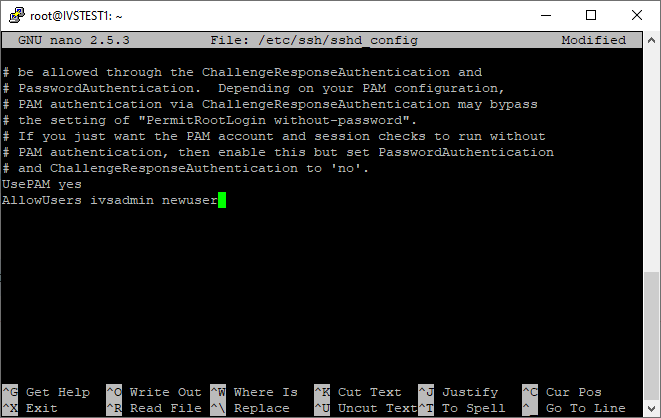
# Modify the '''AllowUsers''' line by adding the new users to the end of the line. | # Modify the '''AllowUsers''' line by adding the new users to the end of the line. | ||
#: | #: {{img | file = user4.png}} | ||
# Press Ctrl-X | # Press Ctrl-X | ||
# Enter Y to save | # Enter Y to save | ||
# Do not change the file name and press enter. | # Do not change the file name and press enter. | ||
Latest revision as of 15:04, 11 May 2022
- Connect to the Valt server via SSH or via the console using an existing user.
- Type the following command the press enter:
sudo nano /etc/ssh/sshd_config
- Scroll to the bottom of the file.
- Modify the AllowUsers line by adding the new users to the end of the line.
- Press Ctrl-X
- Enter Y to save
- Do not change the file name and press enter.