Video controls do not load in Chrome: Difference between revisions
Jump to navigation
Jump to search
IVSWikiBlue (talk | contribs) No edit summary |
IVSWikiBlue (talk | contribs) No edit summary |
||
| Line 1: | Line 1: | ||
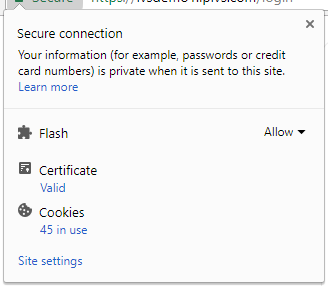
# Click on the information section of the browser. If SSL is used, click on the green lock icon. | # Click on the information section of the browser. If SSL is used, click on the green lock icon. | ||
#: | #:{{img | file = ChromeFlash10.png}} | ||
# Click on '''Site Settings'''. | # Click on '''Site Settings'''. | ||
#: | #:{{img | file = ChromeFlash11.png | width=600px}} | ||
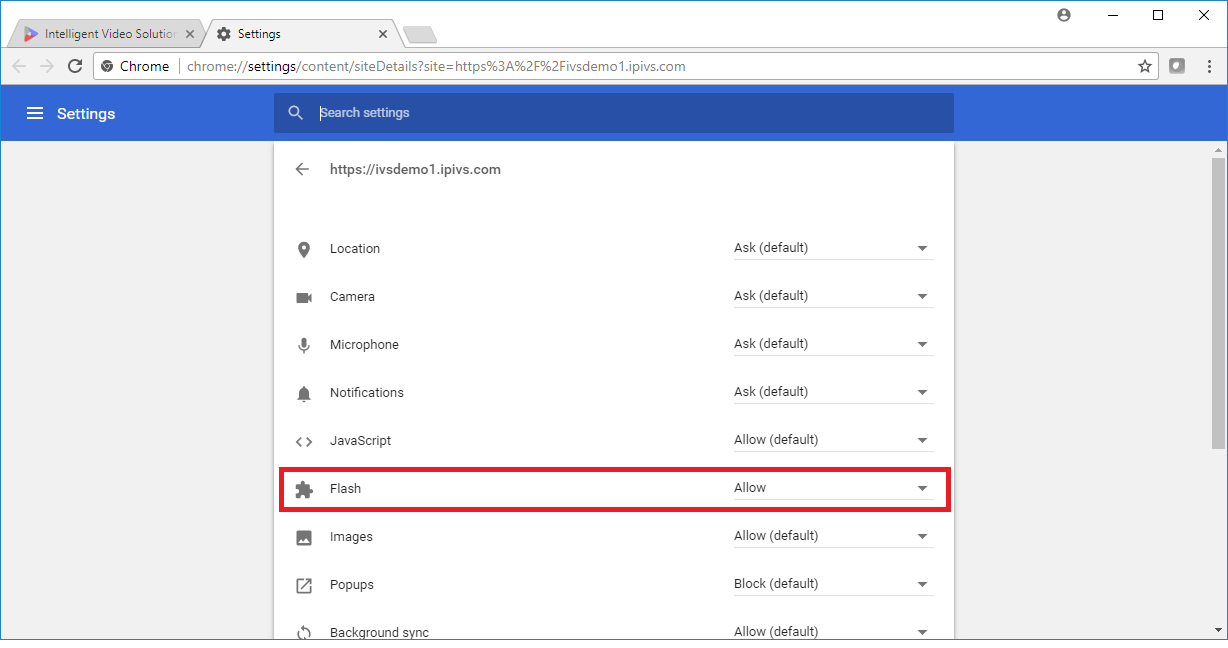
# Change '''Flash''' to '''Allow'''. | # Change '''Flash''' to '''Allow'''. | ||
# Reload the Page. | # Reload the Page. | ||
Revision as of 20:41, 11 May 2022
- Click on the information section of the browser. If SSL is used, click on the green lock icon.
- Click on Site Settings.
- Change Flash to Allow.
- Reload the Page.