Template:Connect the Microphone Verifact A: Difference between revisions
Jump to navigation
Jump to search
IVSWikiBlue (talk | contribs) |
IVSWikiBlue (talk | contribs) No edit summary |
||
| Line 1: | Line 1: | ||
==Connecting the Microphone== | |||
#Mark center of the ceiling tile the Verifact A will be mounted on. | |||
#Using a hole saw, drill a hole at center of the ceiling tile. Feed one end of the the 22/2 cables through the hole. | |||
#:''Note:'' Ensure that the hole will be covered by the microphone | |||
#: [[File:VerifactACutHole.jpg|link=https://ipivs.com/wiki/images/c/ca/VerifactACutHole.jpg]] | |||
#Strip the jacket off the 22/2, revealing the red, black, and common (bare wire) on both sides of the cable. | |||
#Remove the string and plastic casings covering the red and black cables. | |||
#Strip the red and black jackets off the wire exposing the copper. Cut copper evenly on both ends. Remove ground. | |||
#At the Verifact A, connect the power cable to ports A and C. Connect the audio cable to ports B and C. | |||
#:[[File:LouroeVerifactAwires2.JPG|link=https://ipivs.com/wiki/images/3/32/LouroeVerifactAwires2.JPG]] | |||
#Using toggle bolts, secure the microphone. | |||
#: [[File:VerifactATileMount.jpg|link=https://ipivs.com/wiki/images/2/20/VerifactATileMount.jpg]] | |||
Revision as of 15:36, 13 May 2020
Connecting the Microphone
- Mark center of the ceiling tile the Verifact A will be mounted on.
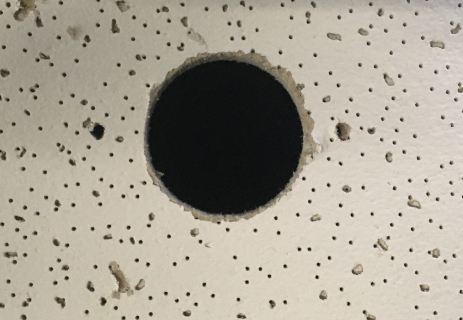
- Using a hole saw, drill a hole at center of the ceiling tile. Feed one end of the the 22/2 cables through the hole.
- Note: Ensure that the hole will be covered by the microphone
- Strip the jacket off the 22/2, revealing the red, black, and common (bare wire) on both sides of the cable.
- Remove the string and plastic casings covering the red and black cables.
- Strip the red and black jackets off the wire exposing the copper. Cut copper evenly on both ends. Remove ground.
- At the Verifact A, connect the power cable to ports A and C. Connect the audio cable to ports B and C.
- Using toggle bolts, secure the microphone.


