Template:Audio Notes Field Description 6.3: Difference between revisions
Jump to navigation
Jump to search
IVSWikiBlue (talk | contribs) Created page with "Audio notes fields allow users to associate audio recordings with the information in a recording. Note that the audio is not indexed or searchable. Audio is recorded using the..." |
IVSWikiBlue (talk | contribs) No edit summary |
||
| Line 1: | Line 1: | ||
Audio notes fields allow users to associate audio recordings with the information in a recording. Note that the audio is not indexed or searchable. Audio is recorded using the client PC microphone or headset. | Audio notes fields allow users to associate audio recordings with the information in a recording. Note that the audio is not indexed or searchable. Audio is recorded using the client PC microphone or headset. | ||
<center>{{img | file = VALT 6.3 Manual-Observe Audio Note.png}}</center> | |||
To create an audio note: | To create an audio note: | ||
Latest revision as of 16:27, 10 March 2025
Audio notes fields allow users to associate audio recordings with the information in a recording. Note that the audio is not indexed or searchable. Audio is recorded using the client PC microphone or headset.
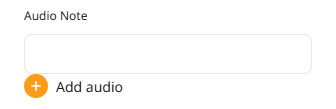
To create an audio note:
- Click the + 'Add audio' button.
- If not already enabled, your browser may request you Allow Access for microphone usage.
- Speak your notes.
- When done, click the • 'stop recording' button.