Axis M5526-E: Difference between revisions
Jump to navigation
Jump to search
IVSWikiBlue (talk | contribs) No edit summary |
IVSWikiBlue (talk | contribs) No edit summary |
||
| Line 46: | Line 46: | ||
*[https://www.axis.com/dam/public/69/1c/b8/datasheet-axis-m5526-e-ptz-camera-en-US-432230.pdf Datasheet (PDF)] | *[https://www.axis.com/dam/public/69/1c/b8/datasheet-axis-m5526-e-ptz-camera-en-US-432230.pdf Datasheet (PDF)] | ||
*[[Camera Settings | IVS Camera Setting Standards]] | *[[Camera Settings | IVS Camera Setting Standards]] | ||
{{hr}} | {{hr}} | ||
| Line 78: | Line 70: | ||
| left = | | left = | ||
{{img - no click | file = 6 port io block.png | width = 300px}} | {{img - no click | file = 6 port io block.png | width = 300px}} | ||
}} | |||
{{hr}} | |||
<h2>Removing the Dome</h2> | |||
{{flexbox - Text Right| right = | |||
To remove the dome, you will need a <b>T20 security bit</b>. Use the T20 to loosen the four screws. Once complete, the dome will be ready to be removed. | |||
| left = {{img - no click | file = M5526 Remove Dome.png | width = 300px}} | |||
}} | }} | ||
}} | }} | ||
Revision as of 21:25, 17 April 2024
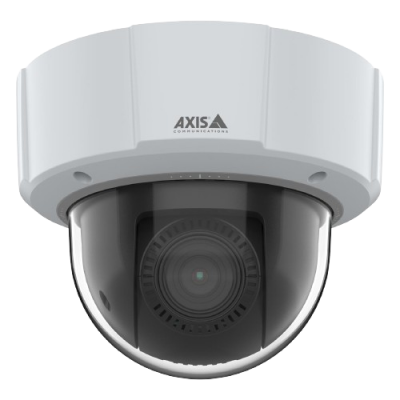
Axis M5526-E
Camera Information
- Max Resolution
- 2688 x 1512
- FOV
- H: 59.1°-6.5°
V: 35°–3.67°
- PoE
- Class 3
- Max Power Draw
- 12.95 W
- Features
- Talkback
- Supports 2 I/O Devices
Additional Resources
Audio and I/O
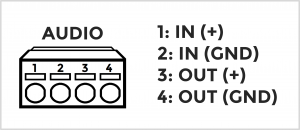
The Axis M5526-E has 2 terminal blocks used for wiring audio and I/O accessories.
The audio block allows for both audio in and audio out. The audio in connects to a variety of microphones, utilizing line level audio.
To see a list of microphones click here.
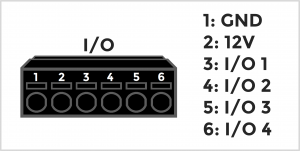
The I/O block for supports 2 I/O accessories.
Popular I/O accessories include the VALT Record Button and the VALT Privacy Button
Removing the Dome
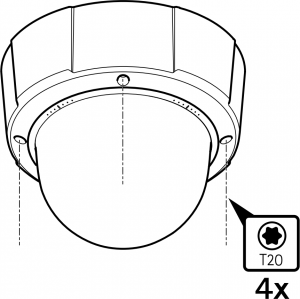
To remove the dome, you will need a T20 security bit. Use the T20 to loosen the four screws. Once complete, the dome will be ready to be removed.