Authentication Workflows: Difference between revisions
Jump to navigation
Jump to search
IVSWikiBlue (talk | contribs) No edit summary |
IVSWikiBlue (talk | contribs) No edit summary |
||
| Line 15: | Line 15: | ||
Local accounts are created and assigned to groups within VALT. Local accounts can be created manually or imported from a [[Importing_Users_from_a_file|list]]. | Local accounts are created and assigned to groups within VALT. Local accounts can be created manually or imported from a [[Importing_Users_from_a_file|list]]. | ||
{{img - | {{img - resize | file = auth_local.jpg}} | ||
{{hr}} | {{hr}} | ||
| Line 22: | Line 22: | ||
LDAP accounts can be imported manually using an LDAP search and lookup tool within the software or imported automatically on a schedule based on group. | LDAP accounts can be imported manually using an LDAP search and lookup tool within the software or imported automatically on a schedule based on group. | ||
{{img - | {{img - resize | file = auth_ldap.jpg}} | ||
{{hr}} | {{hr}} | ||
| Line 37: | Line 37: | ||
{{hr - 2}} | {{hr - 2}} | ||
{{img - | {{img - resize | file = SSO Flow Chart.png}} | ||
</onlyinclude> | </onlyinclude> | ||
}} | }} | ||
Revision as of 21:18, 29 March 2024
Authentication Workflows
There are three different authentication methods that can be used for VALT:
- Local Authentication
- LDAP Authentication
- SSO Authentication
Local Authentication
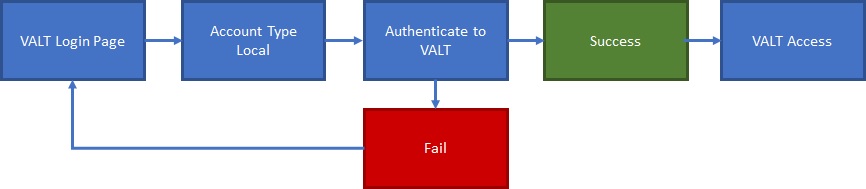
Local accounts are created and assigned to groups within VALT. Local accounts can be created manually or imported from a list.
LDAP Authentication
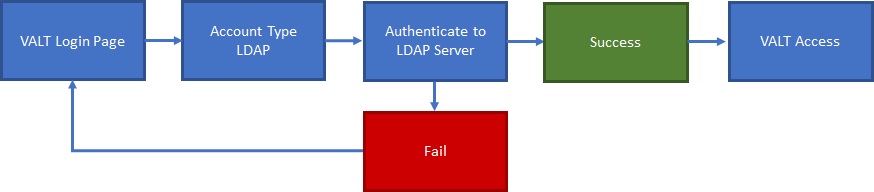
LDAP accounts can be imported manually using an LDAP search and lookup tool within the software or imported automatically on a schedule based on group.
SSO Authentication
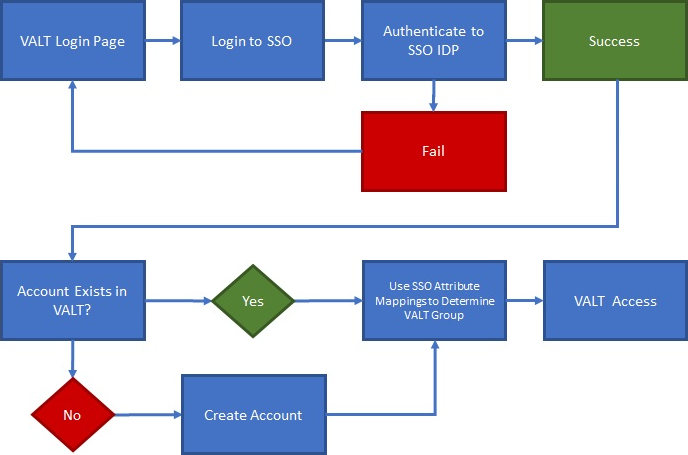
SSO accounts are automatically created when a user logs in for the first time. The user can be placed in the proper group automatically upon login by mapping SSO attributes to a user group within VALT.
- VALT's SSO uses Just-In-Time (JIT) Provisioning.
- Users are reevaluated and assigned to groups each time they log in, based on the group membership attribute being passed.
- If a user does NOT have a user mapping associated with their account, the user gets moved to "Users without Group" and has restricted access.
- If a user's user mapping changes, they will be moved to the correct group upon their next SSO sign-in.
- Correct mapping is based on the SSO mapping created in VALT and the attribute/pair value being passed from the IdP.