Single Sign-On (SSO): Difference between revisions
Jump to navigation
Jump to search
IVSWikiBlue (talk | contribs) No edit summary |
IVSWikiBlue (talk | contribs) No edit summary |
||
| Line 19: | Line 19: | ||
After SSO is configured browse to <code>https://<b><Server Address></b>/saml/metadata.xml</code> to grab the VALT metadata to add to your system | After SSO is configured browse to <code>https://<b><Server Address></b>/saml/metadata.xml</code> to grab the VALT metadata to add to your system | ||
}} | |||
{{Section | title = <h2>User Mapping</h2> | content = | |||
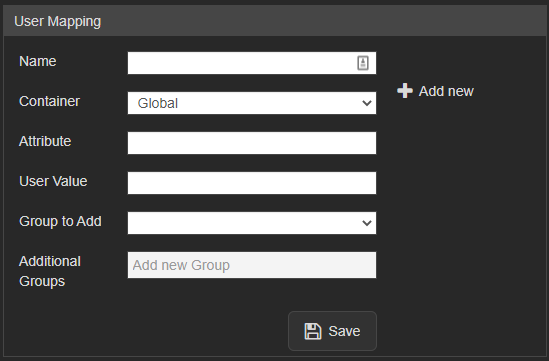
<div class="floating_card">User mapping is used to map groups in the customer's system to groups within VALT</div> | |||
{{Aside | content = <b>NOTE:</b> SSO in VALT is a one to one mapping for groups}} | |||
===Required:=== | |||
<dl> | |||
<dt>Attribute</dt> | |||
<dd>The item that gets passed back to VALT</dd> | |||
<dt>User Value<dt> | |||
<dd>The value of the item that gets passed back to VALT</dd> | |||
</dl> | |||
<hr> | |||
[[File:SAML_UserMapping.png|link=]] | |||
}} | |||
{{Section | title = <h2>Other Notes</h2> | content = | |||
<h2>Moving from LDAP to SSO</h2> | |||
*If moving from LDAP to SSO you have to add a custom attribute to map to the username so the usernames will match correctly | *If moving from LDAP to SSO you have to add a custom attribute to map to the username so the usernames will match correctly | ||
*To migrate current users to SSO the SQL command needs to be run on the database with the correct group ID | *To migrate current users to SSO the SQL command needs to be run on the database with the correct group ID | ||
UPDATE users set ldap_sync_id = NULL, saml_config_id = 1, userType = 'local' where deleted_at is null and group_id = | UPDATE users set ldap_sync_id = NULL, saml_config_id = 1, userType = 'local' where deleted_at is null and group_id = | ||
<hr> | |||
<h2>Custom Attributes</h2> | |||
*Custom Attributes can be usernames if you want to map to something specific or other information that you want to pull into VALT | *Custom Attributes can be usernames if you want to map to something specific or other information that you want to pull into VALT | ||
<hr> | |||
<h2>Additional Settings</h2> | |||
*Shibboleth IDP's need the following settings specified: | *Shibboleth IDP's need the following settings specified: | ||
signAssertions: true | signAssertions: true | ||
signResponses: true | signResponses: true | ||
encryptNameIDs: true | encryptNameIDs: true | ||
}} | }} | ||
Revision as of 21:18, 22 August 2023
VALT is compatible with SAML 2.0
- Browse to the the Fully qualified domain name and sign in with a local account
- Click on admin
- Click on Users & Groups
- Along the top click on SSO and add SAML config
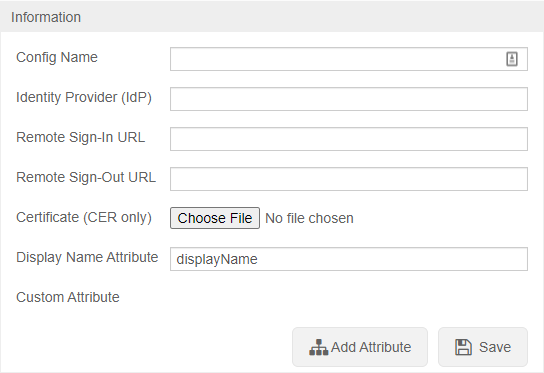
To configure SSO VALT needs the following information:
- Certificate in .cer format
- Identity Provider (IDP)
- Remote Sign-In URL
- Remote Sign-Out URL
- Display Name Attribute
- Any other custom attributes needed
After SSO is configured browse to https://<Server Address>/saml/metadata.xml to grab the VALT metadata to add to your system
User Mapping
User mapping is used to map groups in the customer's system to groups within VALT
✎
NOTE: SSO in VALT is a one to one mapping for groups
Required:
- Attribute
- The item that gets passed back to VALT
- User Value
- The value of the item that gets passed back to VALT