How To Find Your VALT Version: Difference between revisions
Jump to navigation
Jump to search
IVSWikiBlue (talk | contribs) No edit summary |
IVSWikiBlue (talk | contribs) No edit summary |
||
| Line 1: | Line 1: | ||
{{Aside | hue = 200 | icon = 🕮 | content = | {{Aside | hue = 200 | icon = 🕮 | content = | ||
For more information about the VALT versions you can check out our [[Release Notes]].}} | For more information about the VALT versions you can check out our [[Release Notes]].}} | ||
{{img | {{img with key | file = Find My VALT Version.png | list = | ||
| file = Find My VALT Version.png | <li>Go to the <b>Admin</b> section on your VALT server.</li> | ||
| | <li>You will automatically be sent to the <b>General</b> tab.</li> | ||
<li>At the top of the screen you should see the version number your VALT server is running next to <b>Software Version</b>.</li> | |||
}} | }} | ||
Revision as of 14:04, 8 June 2023
🕮
For more information about the VALT versions you can check out our Release Notes.
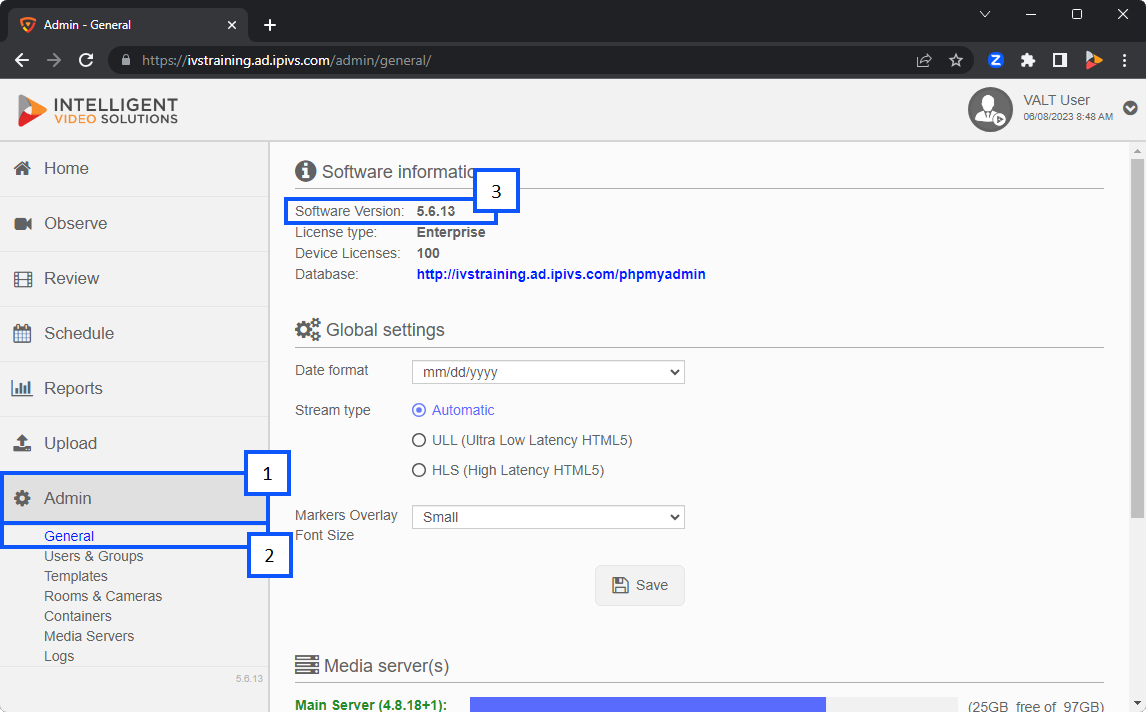
- Go to the Admin section on your VALT server.
- You will automatically be sent to the General tab.
- At the top of the screen you should see the version number your VALT server is running next to Software Version.