5525 Wall Mount Instructions: Difference between revisions
Jump to navigation
Jump to search
IVSWikiBlue (talk | contribs) No edit summary |
IVSWikiBlue (talk | contribs) No edit summary |
||
| Line 19: | Line 19: | ||
#Using a T30 bit, tighten the three screws on top of the pendant kit, securing it to the camera disk. | #Using a T30 bit, tighten the three screws on top of the pendant kit, securing it to the camera disk. | ||
#:[[File:Large screws3.png|300px|link=https://ipivs.com/wiki/images/0/00/Large_screws3.png]] | #:[[File:Large screws3.png|300px|link=https://ipivs.com/wiki/images/0/00/Large_screws3.png]] | ||
#Take the M5525 and plug the ethernet cable into its respective jack on the camera. | |||
#:''The jack will be listed "PoE".'' | |||
#:[[File:5525CAT6.png|350px|link=https://ipivs.com/wiki/images/5/52/5525CAT6.png]] | |||
# | |||
#Take the M5525 and | #Take the M5525 and | ||
#:[[File:Pigtails5525.png|250px|link=https://ipivs.com/wiki/images/1/14/Pigtails5525.png]] | #:[[File:Pigtails5525.png|250px|link=https://ipivs.com/wiki/images/1/14/Pigtails5525.png]] | ||
#:[[File:|350px|link=]] | #:[[File:|350px|link=]] | ||
# | # | ||
#:[[File:|350px|link=]] | #:[[File:|350px|link=]] | ||
Revision as of 21:49, 17 August 2020
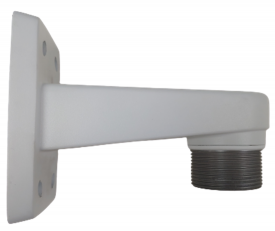
- Locate the AXIS T91E61 Wall Mount.
- This is the recommended wall mount by IVS. Verify the model of your mount here
- Locate the AXIS T94A01D Pendant Kit.
- Connect the two parts and tighten them together by hand.
- Continue tightening, by hand, until you cannot rotate the pendant kit anymore.
- Using a T20 bit, tighten down the screw located inside the pendant kit.
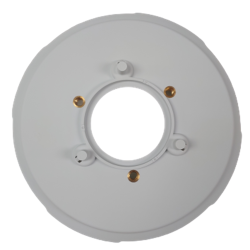
- Locate the mounting plate.
- This part comes packed with the AXIS M5525.
- Take the camera disk and line up the 3 pegs on the top with the three holes on the pendant kit.
- Put the pegs in the holes and rotate the disk counter clockwise until the pieces prevent you from turning more.
- Using a T30 bit, tighten the three screws on top of the pendant kit, securing it to the camera disk.
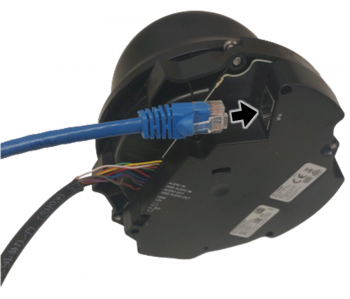
- Take the M5525 and plug the ethernet cable into its respective jack on the camera.
- The jack will be listed "PoE".
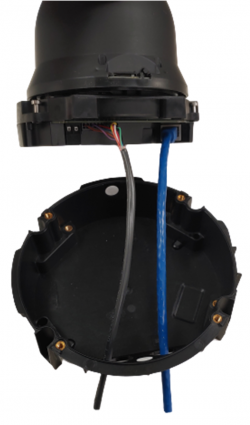
- Take the M5525 and
- [[File:|350px|link=]]
-
- [[File:|350px|link=]]


