IVS Wiki:Privacy Rules: Difference between revisions
Jump to navigation
Jump to search
IVSWikiBlue (talk | contribs) No edit summary |
IVSWikiBlue (talk | contribs) No edit summary |
||
| Line 137: | Line 137: | ||
{{Manual lvl 2 | title = Privacy PTZ | content = | {{Manual lvl 2 | title = Privacy PTZ | content = | ||
Click Events → Action Rules. | |||
{{Manual lvl 3 | title = General | content = | |||
<table class="wikitable" style="width:100%"> | |||
<tr> | |||
<th>Setting</th> | |||
<th>Value</th> | |||
</tr> | |||
<tr> | |||
<td>Enable rule</td> | |||
<td>{<em>Checked</em></td> | |||
</tr> | |||
<tr> | |||
<td>Name</td> | |||
<td>Privacy PTZ</td> | |||
</tr> | |||
</table> | |||
}} | |||
{{Manual lvl 3 | title = Condition | content = | |||
<table class="wikitable" style="width:100%"> | |||
<tr> | |||
<th>Setting</th> | |||
<th>Value</th> | |||
</tr> | |||
<tr> | |||
<td>Trigger</td> | |||
<td>Input Signal</td> | |||
</tr> | |||
<tr> | |||
<td>Port</td> | |||
<td>Digital Input 3</td> | |||
</tr> | |||
<tr> | |||
<td>Start condition only</td> | |||
<td>{<em>Checked</em></td> | |||
</tr> | |||
<tr> | |||
<td>Schedule</td> | |||
<td>Set to Always or a custom schedule.</td> | |||
</tr> | |||
</table> | |||
}} | |||
{{Manual lvl 3 | title = Actions | content = | |||
<table class="wikitable" style="width:100%"> | |||
<tr> | |||
<th>Setting</th> | |||
<th>Value</th> | |||
</tr> | |||
<tr> | |||
<td>Type</td> | |||
<td>PTZ Control</td> | |||
</tr> | |||
<tr> | |||
<td>Control</td> | |||
<td>Preset Position</td> | |||
</tr> | |||
<tr> | |||
<td>Go to</td> | |||
<td>Privacy Position (H)</td> | |||
</tr> | |||
<tr> | |||
<td>(Optional) Return to home position when the rule is no longer active</td> | |||
<td>Set a delay (e.g., 1 second) before returning.</td> | |||
</tr> | |||
</table> | |||
}} | |||
{{Section - Expand | title = Image Example | color = #f6c62a | content = {{img - resize | file = PrivacyPTZ.png}} }} | {{Section - Expand | title = Image Example | color = #f6c62a | content = {{img - resize | file = PrivacyPTZ.png}} }} | ||
Revision as of 04:22, 15 March 2025
Getting Started
- Set Privacy mask
- Privacy PTZ position
Create Recipients
Local Recipient
http://127.0.0.1/axis-cgi/param.cgi
⚠
Many firmware versions will not work with 127.0.0.1. If this does not work for you, change the IP to the IP assigned to that camera.
Remote Recipient
http://<CAMERA_IP>/axis-cgi/param.cgi
If there are multiple cameras you will need to add multiple remote recipients and rules tied to those remote recipients.
INSTEAD:
- For any remote/slave cameras:
- Set I/O ports
- Create privacy presets
- Create masks
- Create recipients
⚠
Do not load rules. The master camera will contain all rules.
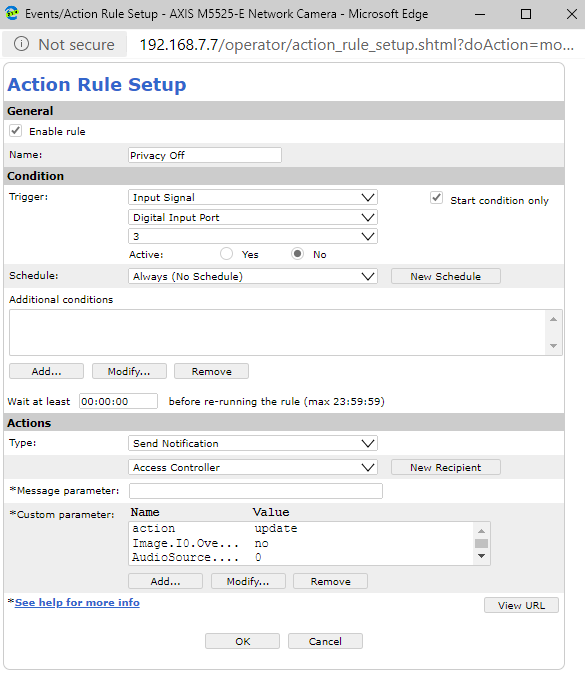
Create Events
Privacy Off
The following parameters should be used in the Action Rule Setup.
⚠
Set the gain to what you need for the audio to sound loud and clear.
| Name | Value |
|---|---|
| action | update |
| Image.I0.Overlay.MaskWindows.M0.Enabled | no |
| AudioSource.A0.InputGain | 0 |
| PTZ.Various.V1.PanEnabled | true |
| PTZ.Various.V1.TiltEnabled | true |
| PTZ.Various.V1.ZoomEnabled | true |
| autofocus | on |
Image Example
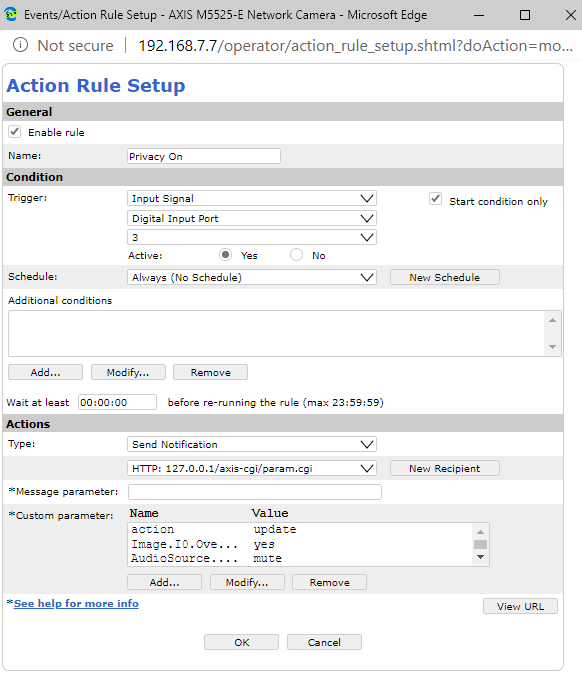
Privacy On
The following parameters should be used in the Action Rule Setup.
| Name | Value |
|---|---|
| action | update |
| Image.I0.Overlay.MaskWindows.M0.Enabled | yes |
| AudioSource.A0.InputGain | mute |
| PTZ.Various.V1.PanEnabled | false |
| PTZ.Various.V1.TiltEnabled | false |
| PTZ.Various.V1.ZoomEnabled | false |
Image Example
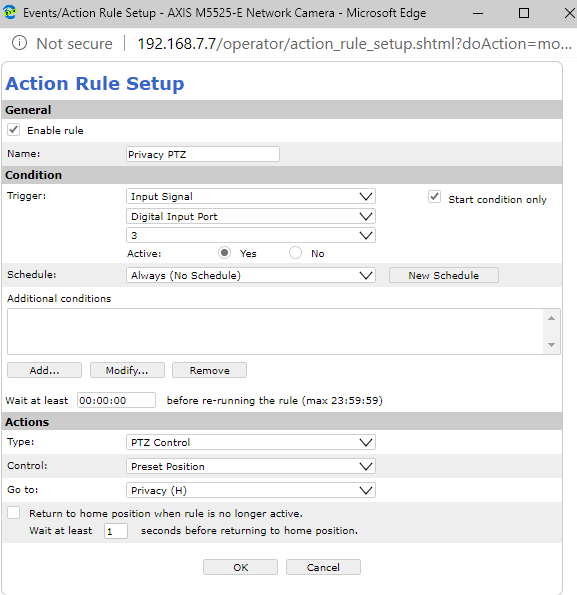
Privacy PTZ
Click Events → Action Rules.
General
| Setting | Value |
|---|---|
| Enable rule | {Checked |
| Name | Privacy PTZ |
Condition
| Setting | Value |
|---|---|
| Trigger | Input Signal |
| Port | Digital Input 3 |
| Start condition only | {Checked |
| Schedule | Set to Always or a custom schedule. |
Actions
| Setting | Value |
|---|---|
| Type | PTZ Control |
| Control | Preset Position |
| Go to | Privacy Position (H) |
| (Optional) Return to home position when the rule is no longer active | Set a delay (e.g., 1 second) before returning. |
Image Example