Single Sign-On (SSO): Difference between revisions
IVSWikiBlue (talk | contribs) No edit summary |
IVSWikiBlue (talk | contribs) No edit summary |
||
| Line 25: | Line 25: | ||
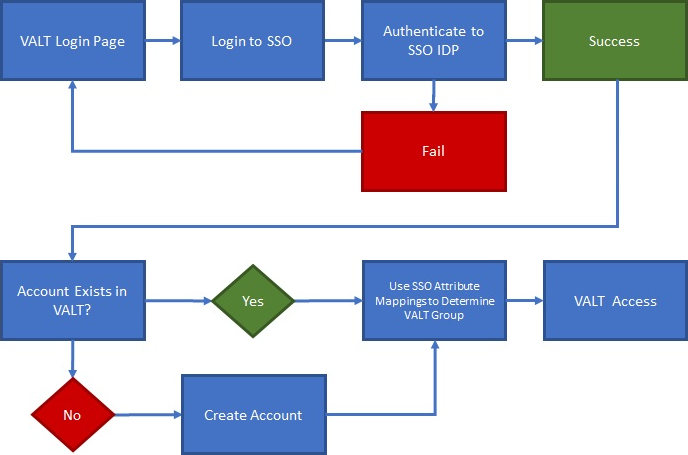
{{img - resize | file = SSO Flow Chart.png}} | {{img - resize | file = SSO Flow Chart.png}} | ||
{{hr}} | |||
==Metadata Files== | |||
{{:VALT SSO - VALT's Metadata File}} | |||
{{hr}} | {{hr}} | ||
Revision as of 22:40, 2 January 2025
SSO Configuration
Scheduling an SSO Configuration
You can also schedule a SSO Discovery at our booking site under Schedule a Support Session. During that call, we will discuss the prerequisites for configuring your VALT server to utilize SSO Authentication.
SSO Authentication
SSO accounts are automatically created when a user logs in for the first time. The user can be placed in the proper group automatically upon login by mapping SSO attributes to a user group within VALT.
- VALT's SSO uses Just-In-Time (JIT) Provisioning.
- Users are reevaluated and assigned to groups each time they log in, based on a group membership attribute being passed.
- If a user does NOT have a user mapping associated with their account, the user gets moved to "Users without Group" and has restricted access.
- If a user's user mapping changes, they will be moved to the correct group upon their next SSO sign-in.
- Correct mapping is based on the SSO mapping created in VALT and the attribute/pair value being passed from the IdP.
Metadata Files
VALT's metadata.xml file is only generated after the Identity Provider (IdP) metadata file is uploaded to VALT.
To generate the IdP XML file, most providers require the Service Provider (SP) information, specifically the entityID and replyURL.
VALT's Information
- entityID
- This will be the FQDN of the server.
- Example: https://valt.ipivs.com
- replyURL
- This will be the FQDN of the server + 'saml/login_check'.
- Example: https://valt.ipivs.com/saml/login_check
Required Information from IdP
Optional Items
VALT is also able to map custom attributes to some of the following fields for a user. Below are the user account fields that can be assigned through SSO.
- PIN
- This specifies the code used for authentication into BEAM.
- Without one set, no pin is needed to enter BEAM.
- Card Number
- This specifies the card number associated with a user.
- Only applies to customers with VALT Card Reader.
- The users email can also be pulled into the system.
- If the VALT application is not connected to mail server, this field is not used for anything.
Additional Settings
Shibboleth needs the following settings configured to function with VALT.
- signAssertions:
- true
- signResponses:
- true
- encryptNameIDs:
- true
- encryptAssertions:
- false
⤺ Back to VALT SSO Main Page