Difference between revisions of "Authentication Workflows"
IVSWikiBlue (talk | contribs) |
IVSWikiBlue (talk | contribs) |
||
| Line 1: | Line 1: | ||
| − | + | {{Article - Manual | content = <onlyinclude> | |
| − | {{Article | + | <h1>Authentication Methods</h1> |
| − | < | + | {{Grid 2 - Grid | left = There are three different authentication methods that can be used for VALT. |
| − | There are three different authentication methods that can be used for VALT | ||
| − | + | #Local | |
| − | + | #LDAP/LDAPS | |
| − | + | #SSO | |
| − | + | | right = | |
| − | + | {{Aside | content = Any combination of these can be implemented and used at the same time.}} | |
| + | }} | ||
{{hr}} | {{hr}} | ||
| − | + | {{Manual lvl 2 | title = Local Authentication | content = | |
| − | Local accounts are created and assigned to groups within VALT. Local accounts can be created manually or imported from a [[Importing_Users_from_a_file|list]]. | + | Local accounts are created and assigned to groups within VALT. Local accounts can be created manually or imported from a [[Importing_Users_from_a_file|list]].}} |
{{img - resize | file = auth_local.jpg}} | {{img - resize | file = auth_local.jpg}} | ||
| Line 19: | Line 19: | ||
{{hr}} | {{hr}} | ||
| − | + | {{Manual lvl 2 | title = LDAP Authentication | content = | |
| − | LDAP accounts can be imported manually using an LDAP search and lookup tool within the software or imported automatically on a schedule based on group. | + | LDAP accounts can be imported manually using an LDAP search and lookup tool within the software or imported automatically on a schedule based on group.}} |
{{img - resize | file = auth_ldap.jpg}} | {{img - resize | file = auth_ldap.jpg}} | ||
| Line 26: | Line 26: | ||
{{hr}} | {{hr}} | ||
| − | + | {{Manual lvl 2 | title = SSO Authentication | content = | |
| − | SSO accounts are automatically created when a user logs in for the first time. The user can be placed in the proper group automatically upon login by mapping SSO attributes to a user group within VALT. | + | SSO accounts are automatically created when a user logs in for the first time. The user can be placed in the proper group automatically upon login by mapping SSO attributes to a user group within VALT.}} |
| − | |||
| − | |||
| − | |||
| − | |||
| − | |||
| − | |||
| − | |||
| − | |||
| − | {{img - resize | file = SSO Flow Chart.png}} | + | <center>{{img - resize | file = SSO Flow Chart.png | width = 600px}}</center> |
| − | + | {{Top of Page}} | |
| − | + | </onlyinclude>}} | |
| − | {{ | ||
| − | |||
| − | |||
| − | }} | ||
Revision as of 09:38, 25 June 2026
Authentication Methods
There are three different authentication methods that can be used for VALT.
- Local
- LDAP/LDAPS
- SSO
✎
Any combination of these can be implemented and used at the same time.
Local Authentication
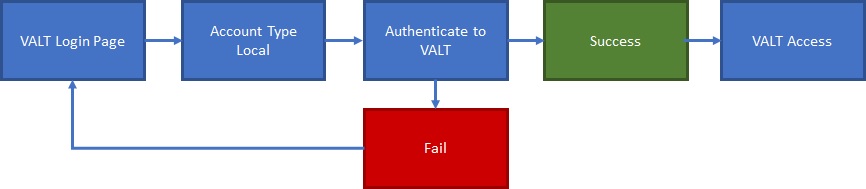
Local accounts are created and assigned to groups within VALT. Local accounts can be created manually or imported from a list.
LDAP Authentication
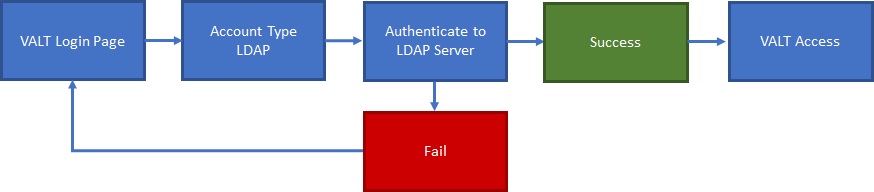
LDAP accounts can be imported manually using an LDAP search and lookup tool within the software or imported automatically on a schedule based on group.
SSO Authentication
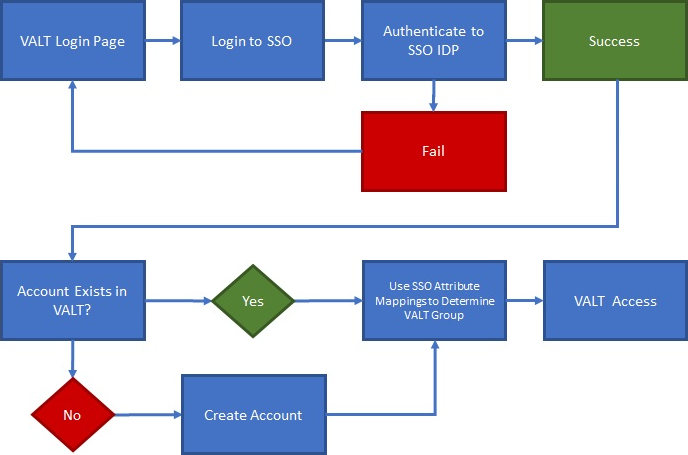
SSO accounts are automatically created when a user logs in for the first time. The user can be placed in the proper group automatically upon login by mapping SSO attributes to a user group within VALT.