Bluetooth Talkback - Delete Pairings: Difference between revisions
Jump to navigation
Jump to search
IVSWikiBlue (talk | contribs) No edit summary |
IVSWikiBlue (talk | contribs) m IVSWikiBlue moved page Bluetooth Talk Back - Delete Pairings to Bluetooth Talkback - Delete Pairings |
(No difference)
| |
Revision as of 15:05, 5 January 2023
Perform the following steps to delete any existing Bluetooth® pairings from memory.
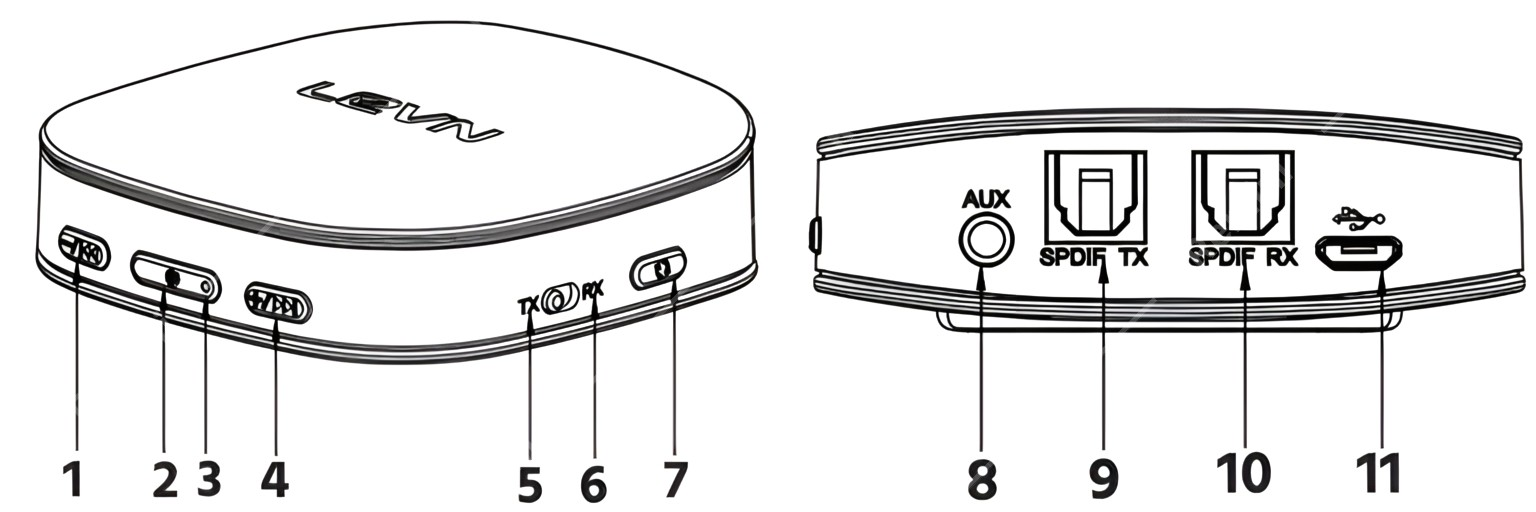
- If the device is not already powered on, press and hold the POWER button (#2 Above) for about 2 seconds to turn the device on. The LED (#3 above) will flash blue twice.
- Wait at least 3 seconds, then press and hold the POWER button for about 2 seconds to turn the device off. The LED will flash red twice.
- Wait at least 3 seconds, then slide the TX/RX (#5 & #6 above) switch to the opposite position.
- Press and hold the POWER button to turn the device on. The LED will flash blue twice. All Bluetooth pairings are now cleared.