Importing Users from a file: Difference between revisions
Jump to navigation
Jump to search
IVSWikiBlue (talk | contribs) No edit summary |
IVSWikiBlue (talk | contribs) No edit summary |
||
| Line 1: | Line 1: | ||
To import users from a file click on the "Import Users" link under Administration --> Users and Groups users can be imported from a xlxs, cvs, or txt file. See below for formatting details. | <div class="floating_card">To import users from a file click on the "Import Users" link under Administration --> Users and Groups users can be imported from a xlxs, cvs, or txt file. See below for formatting details.</div> | ||
a. Excel: format xlsx | a. Excel: format xlsx | ||
Revision as of 13:30, 19 October 2022
To import users from a file click on the "Import Users" link under Administration --> Users and Groups users can be imported from a xlxs, cvs, or txt file. See below for formatting details.
a. Excel: format xlsx
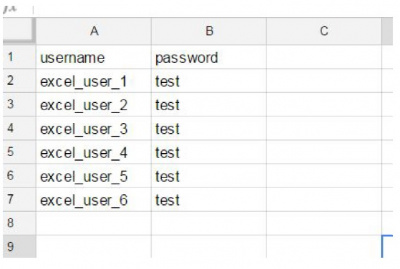

    b. CSV:
       username,password
       excel_user_1,test
       excel_user_2,test
       excel_user_3,test
       excel_user_4,test
       excel_user_5,test
       excel_user_6,test
     c. TXT:
        username:password
        txt_user_1:test
        txt_user_2:test
        txt_user_3:test
        txt_user_4:test
        txt_user_5:test
        txt_user_6:test
Delimiter can be ”:” “,” “.” “;”