Template:File Field Description 6.3: Difference between revisions
Jump to navigation
Jump to search
IVSWikiBlue (talk | contribs) Created page with "File fields allow users to upload files to the template. These files will display with a video as an attached file in the information template. Users will be prompted to downl..." |
IVSWikiBlue (talk | contribs) No edit summary |
||
| (One intermediate revision by the same user not shown) | |||
| Line 1: | Line 1: | ||
File fields allow users to upload files to the template. These files will display with a video as an attached file in the information template. Users will be prompted to download the file when trying to access it. | File fields allow users to upload files to the template. These files will display with a video as an attached file in the information template. Users will be prompted to download the file when trying to access it. | ||
{{ | <center>{{img | file = VALT 6.3 Manual-Observe File.png}}</center> | ||
<b>Allowed file types</b>: .pdf, .xlsx, .xls, .doc, .docx, .rft | |||
<b>Max file size</b>: 100 MB | |||
<b>Max # number of files</b>: 10 | |||
Latest revision as of 16:31, 10 March 2025
File fields allow users to upload files to the template. These files will display with a video as an attached file in the information template. Users will be prompted to download the file when trying to access it.
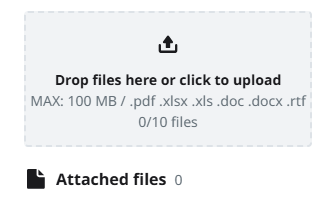
Allowed file types: .pdf, .xlsx, .xls, .doc, .docx, .rft
Max file size: 100 MB
Max # number of files: 10