Bluetooth Talkback - Delete Pairings: Difference between revisions
Jump to navigation
Jump to search
IVSWikiBlue (talk | contribs) No edit summary |
IVSWikiBlue (talk | contribs) No edit summary |
||
| (4 intermediate revisions by the same user not shown) | |||
| Line 1: | Line 1: | ||
<div class="floating_card">Perform the following steps to delete any existing Bluetooth® pairings from memory.</div> | <div class="floating_card">Perform the following steps to delete any existing Bluetooth® pairings from memory.</div> | ||
{{img | file = Monoprice 38071 Overview.png}} | {{img | file = Monoprice 38071 Overview.png | width = 800px}} | ||
<div class="section"> | <div class="section"> | ||
#If the device is not already powered on, press and hold the <b>POWER</b> button <b>(#2 Above)</b> for about 2 seconds to turn the device on. The <b>LED (#3 above)</b> will flash blue twice. | |||
#Wait at least 3 seconds, then press and hold the POWER button for about 2 seconds to turn the device off. The LED will flash red twice. | |||
#Wait at least 3 seconds, then slide the <b>TX/RX (#5 & #6 above)</b> switch to the opposite position. | |||
#Press and hold the POWER button to turn the device on. The LED will flash blue twice. All Bluetooth pairings are now cleared. | |||
</div> | </div> | ||
{{Main Page | page = Bluetooth Talkback}} | |||
Latest revision as of 22:22, 5 January 2023
Perform the following steps to delete any existing Bluetooth® pairings from memory.
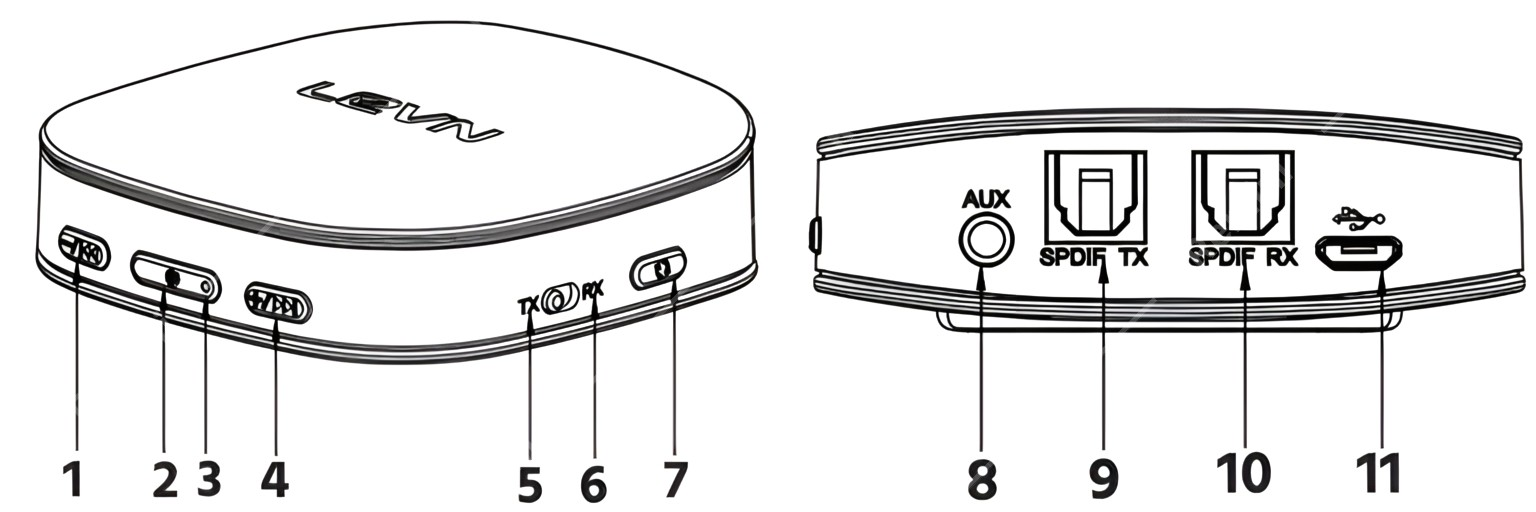
- If the device is not already powered on, press and hold the POWER button (#2 Above) for about 2 seconds to turn the device on. The LED (#3 above) will flash blue twice.
- Wait at least 3 seconds, then press and hold the POWER button for about 2 seconds to turn the device off. The LED will flash red twice.
- Wait at least 3 seconds, then slide the TX/RX (#5 & #6 above) switch to the opposite position.
- Press and hold the POWER button to turn the device on. The LED will flash blue twice. All Bluetooth pairings are now cleared.