Unable to Upgrade Ubuntu: Difference between revisions
Jump to navigation
Jump to search
IVSWikiBlue (talk | contribs) No edit summary |
IVSWikiBlue (talk | contribs) No edit summary |
||
| (4 intermediate revisions by the same user not shown) | |||
| Line 1: | Line 1: | ||
==UnicodeDecodeError: 'utf-8' codec can't decode byte== | ==UnicodeDecodeError: 'utf-8' codec can't decode byte== | ||
When attempting to update Ubuntu from version 14.04 LTS to 16.04, you may encounter an error when entering the following command: <pre>do-release-upgrade</pre> | When attempting to update Ubuntu from version 14.04 LTS to 16.04, you may encounter an error when entering the following command: | ||
: | :: <pre>do-release-upgrade</pre> | ||
This error is caused by non | :::{{img | file = TS1.png}} | ||
This error is caused by non UTF-8 characters in the /var/lib/dpkg/status file. Follow the instructions below to identify and remove these characters. | |||
# Enter the following command: <pre>grep -avx '.*' /var/lib/dpkg/status</pre> | # Enter the following command: <pre>grep -avx '.*' /var/lib/dpkg/status</pre> | ||
#: This will display any not | #: This will display any not UTF-8 characters in the file. | ||
#: | #:{{img | file = TS1.png}} | ||
# Enter the following command: <pre>sudo nano /var/lib/dpkg/status</pre> | # Enter the following command: <pre>sudo nano /var/lib/dpkg/status</pre> | ||
# Locate the bad characters and delete them. | # Locate the bad characters, and delete them. | ||
# Save the file. | # Save the file. | ||
| Line 14: | Line 15: | ||
#: This will display all the kernels currently installed. All but the most recent can be safely deleted. | #: This will display all the kernels currently installed. All but the most recent can be safely deleted. | ||
# Enter the following: <pre>apt-get remove ''old-linux-kernel-package-name''</pre> | # Enter the following: <pre>apt-get remove ''old-linux-kernel-package-name''</pre> | ||
:: <pre>Ex: ''apt-get remove linux-image-3.13.0-32-generic''</pre> | |||
Latest revision as of 20:57, 11 May 2022
UnicodeDecodeError: 'utf-8' codec can't decode byte
When attempting to update Ubuntu from version 14.04 LTS to 16.04, you may encounter an error when entering the following command:
do-release-upgrade
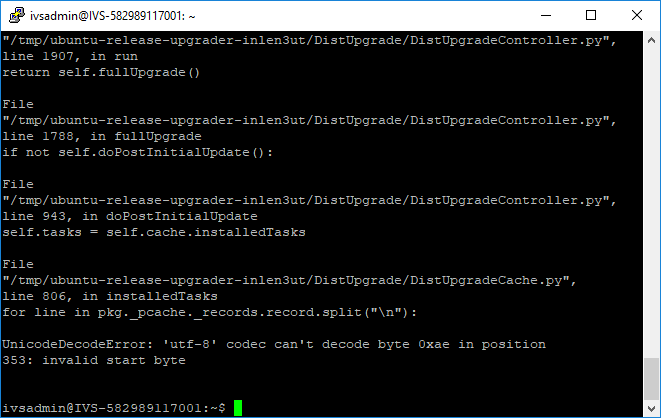
This error is caused by non UTF-8 characters in the /var/lib/dpkg/status file. Follow the instructions below to identify and remove these characters.
- Enter the following command:
grep -avx '.*' /var/lib/dpkg/status
- This will display any not UTF-8 characters in the file.

- Enter the following command:
sudo nano /var/lib/dpkg/status
- Locate the bad characters, and delete them.
- Save the file.
/boot is out of space
- Enter the following command:
dpkg -l | grep linux-image
- This will display all the kernels currently installed. All but the most recent can be safely deleted.
- Enter the following:
apt-get remove ''old-linux-kernel-package-name''
Ex: ''apt-get remove linux-image-3.13.0-32-generic''