VALT Keypad: Difference between revisions
Jump to navigation
Jump to search
IVSWikiBlue (talk | contribs) No edit summary |
IVSWikiBlue (talk | contribs) No edit summary |
||
| (8 intermediate revisions by the same user not shown) | |||
| Line 1: | Line 1: | ||
{{Article - Manual | title = VALT Keypad | content = | {{Article - Manual | title = VALT Keypad | content = | ||
{{Float | content = [[VALT Room Controls| ⤺ Back to VALT Room Controls]] }} | |||
<h1>VALT Keypad</h1> | |||
<onlyinclude> | <onlyinclude> | ||
{{Flexbox - Text Right | {{Flexbox - Text Right | ||
| right = | | right = | ||
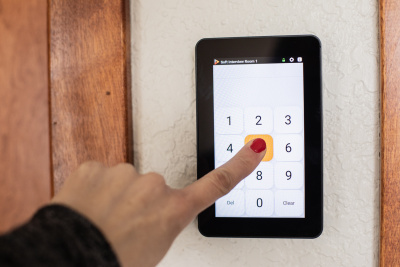
The <b>VALT Keypad</b> is mounted inside or outside a room. Users enter a unique pin code that identifies them as the author of the recording and who the recording is shared with. Use the keypad to start, stop and pause recording. And add time-stamped markers to an active video recording, so you can jump to key moments in video playback. | The <b>VALT Keypad</b> is mounted inside or outside a room. Users enter a unique pin code that identifies them as the [[VALT_Manual_Review#Author | author]] of the recording and who the recording is shared with. Use the keypad to [[VALT_Manual_Observe#Recording | start, stop]] and [[VALT_Manual_Observe#Pause_a_Recording | pause]] recording. And add time-stamped markers to an [[VALT_Manual_Observe#Recording | active video recording]], so you can jump to key moments in [[VALT_Manual_Review | video playback]]. | ||
{{hr - 2}} | |||
<strong>Benefits:</strong> | |||
*User autonomy to start and stop recording. | |||
*Manage recording at the room. | |||
*Distribute video based on author permissions. | |||
*Add markers with one press of a digital button. | |||
|left = | |||
{{img - no click | width = 270px | file = Keypad-3.png}} | |||
}} | |||
</onlyinclude> | </onlyinclude> | ||
{{hr - 2}} | {{hr - 2}} | ||
{{Manual lvl 2 | title = Product Dimensions & Specs | content = | |||
*<strong>Model Name:</strong> | {{Flexbox | | ||
right = {{img - no click | file = Keypad-6.jpg | width = 400px }} | |||
| left = | |||
*<strong>Model Name:</strong> VTKP-K | |||
*<strong>Screen Size:</strong> 5” | *<strong>Screen Size:</strong> 5” | ||
*<strong>Screen Resolution:</strong> 1280x720 | *<strong>Screen Resolution:</strong> 1280x720 | ||
| Line 17: | Line 33: | ||
*<strong>Power:</strong> POE 802.3AF | *<strong>Power:</strong> POE 802.3AF | ||
*<strong>Weight:</strong> 200G | *<strong>Weight:</strong> 200G | ||
}} }} | |||
{{ | {{Top of Page}} | ||
}} | |||
}} | }} | ||
Latest revision as of 21:42, 26 October 2026
VALT Keypad
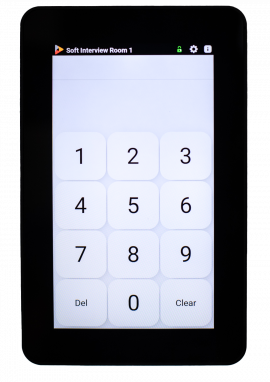
The VALT Keypad is mounted inside or outside a room. Users enter a unique pin code that identifies them as the author of the recording and who the recording is shared with. Use the keypad to start, stop and pause recording. And add time-stamped markers to an active video recording, so you can jump to key moments in video playback.
Benefits:
- User autonomy to start and stop recording.
- Manage recording at the room.
- Distribute video based on author permissions.
- Add markers with one press of a digital button.
Product Dimensions & Specs
- Model Name: VTKP-K
- Screen Size: 5”
- Screen Resolution: 1280x720
- Touch Screen Type: Capacitive 10-point Multitouch
- Processor Speed: 1.2GHZ
- RAM: 1GB
- Network Connectivity: RJ45
- Power: POE 802.3AF
- Weight: 200G