IVS Wiki:VALT Permissions - Specifiactions: Difference between revisions
IVSWikiBlue (talk | contribs) No edit summary |
IVSWikiBlue (talk | contribs) No edit summary |
||
| (9 intermediate revisions by the same user not shown) | |||
| Line 15: | Line 15: | ||
<div style="width: 70%"> | <div style="width: 70%"> | ||
The [https://www.ipivs.com/products/valt-software VALT Software] is compromised of {{img - tooltip | text = 6 main sections | file = VALT 6-4-18 Users&Groups 01.png | width = | The [https://www.ipivs.com/products/valt-software VALT Software] is compromised of {{img - tooltip | text = 6 main sections | file = VALT 6-4-18 Users&Groups 01.png | width = 700px}}. | ||
| Line 27: | Line 27: | ||
# [[VALT API|API]] | # [[VALT API|API]] | ||
{{hr}} | {{hr}} | ||
| Line 39: | Line 37: | ||
{{img - resize | file = VALT 6-4-18 Users&Groups 02.png}} | {{img - resize | file = VALT 6-4-18 Users&Groups 02.png}} | ||
{{hr}} | {{hr}} | ||
| Line 50: | Line 46: | ||
}} | }} | ||
{{hr}} | {{hr}} | ||
| Line 58: | Line 52: | ||
<dl> | <dl> | ||
<dt style="font-size: 18px; font-weight: bold; color: #1f4d78; font-style: italic">Group-Level</dt> | <dt style="font-size: 18px; font-weight: bold; color: #1f4d78; font-style: italic">Group-Level</dt> | ||
<dd>Here are lists of the {{img - tooltip | text = rights | file = VALT 6-4-18 Users&Groups 03.png | width = | <dd>Here are lists of the {{img - tooltip | text = rights | file = VALT 6-4-18 Users&Groups 03.png | width = 900px}} within VALT and the corresponding access they grant. The tables below illustrate whether each permission can be configured at the group level, user level, or both.</dd> | ||
{{hr - 2}} | {{hr - 2}} | ||
| Line 68: | Line 62: | ||
}} | }} | ||
{{hr - 2}} | {{hr - 2}} | ||
{{Manual lvl 3 | title = Available Rights | content = | {{Manual lvl 3 | title = Available Rights | content = | ||
The following section aims to highlight a few key permissions in each section that one might want to consider enabling/disabling. If you want to see a more comprehensive list of permissions, [[Permissions | click here]]. | |||
{{hr}} | |||
<dl> | <dl> | ||
<dt style="font-size: 18px; font-weight: bold; color: #1f4d78; font-style: italic">General</dt> | <dt style="font-size: 18px; font-weight: bold; color: #1f4d78; font-style: italic">General</dt> | ||
<dd> | <dd> | ||
Grants access to the features within the General section. | Grants access to the features within the General section. | ||
{{Aside - Helpful | content = This section applies to buttons or notifications that are <b>system wide</b>.}} | {{Aside - Helpful | content = This section applies to buttons or notifications that are <b>system wide</b>.}} | ||
</dd> | |||
</dl> | |||
{{Section | title = Sample of General Rights | content = | {{Section | title = Sample of General Rights | content = | ||
| Line 86: | Line 83: | ||
{{Level 2 Custom | icon = {{Checkbox - VALT Empty}} | name = <strong>Change Password</strong> | text = Grants the ability for a user to change their password if the account is a local user type}} | {{Level 2 Custom | icon = {{Checkbox - VALT Empty}} | name = <strong>Change Password</strong> | text = Grants the ability for a user to change their password if the account is a local user type}} | ||
}} | }} | ||
{{hr - 2}} | {{hr - 2}} | ||
| Line 99: | Line 91: | ||
<dd> | <dd> | ||
This section of the software is used to view live sessions and create recordings. | This section of the software is used to view live sessions and create recordings. | ||
</dd> | |||
</dl> | |||
{{Section | title = Sample of Observe Rights {{Float | content = {{img - icon | file = Observe.png | width = 18px}} }} | content = | {{Section | title = Sample of Observe Rights {{Float | content = {{img - icon | file = Observe.png | width = 18px}} }} | content = | ||
{{Level 1 Custom | icon = {{Checkbox - VALT}} | name = <strong>Recording</strong> | text = These settings are used in the Observe section of the software. To start a recording a user must also have access to the live observation}} | {{Level 1 Custom | icon = {{Checkbox - VALT}} | name = <strong>Recording</strong> | text = These settings are used in the Observe section of the software. To start a recording a user must also have access to the live observation}} | ||
{{Level 2 Custom | icon = {{Checkbox - VALT}} | name = <strong>Start</strong> | text = Grants the ability to start recordingings}} | {{Level 2 Custom | icon = {{Checkbox - VALT}} | name = <strong>Start</strong> | text = Grants the ability to start recordingings}} | ||
{{Level | {{Level 2 Custom | icon = {{Checkbox - VALT Partial}} | name = <strong>Comments</strong> | text = Comments are used to add information to specific points within a recording}} | ||
{{Level | {{Level 3 Custom | icon = {{Checkbox - VALT}} | name = <strong>Add</strong> | text = Grants the ability to add comments to a recording}} | ||
{{Level | {{Level 3 Custom | icon = {{Checkbox - VALT Partial}} | name = <strong>Delete</strong> | text = Grants the ability to a user to delete their comments}} | ||
{{Level 4 Custom | icon = {{Checkbox - VALT Empty}} | name = <strong>All Authors</strong> | text = Grants the ability to delete any existing comments}} | |||
{{Level 3 Custom | icon = {{Checkbox - VALT Partial}} | name = <strong>Edit</strong> | text = Grants the ability to a user to edit their comments}} | |||
{{Level 4 Custom | icon = {{Checkbox - VALT Empty}} | name = <strong>All Authors</strong> | text = Grants the ability to a user to edit any existing comments}} | |||
}} | }} | ||
{{hr - 2}} | {{hr - 2}} | ||
| Line 123: | Line 115: | ||
{{Section | title = Sample of Review Rights {{Float | content = {{img - icon | file = Review.png | width = 18px}} }} | content = | {{Section | title = Sample of Review Rights {{Float | content = {{img - icon | file = Review.png | width = 18px}} }} | content = | ||
{{Level 1 Custom | icon = {{Checkbox - VALT Partial}} | name = <strong> | {{Level 1 Custom | icon = {{Checkbox - VALT}} | name = <strong>Download</strong> | text = Grants the ability to download recordings}} | ||
{{Level 2 Custom | icon = {{Checkbox - VALT}} | name = <strong> | {{Level 1 Custom | icon = {{Checkbox - VALT Partial}} | name = <strong>Comments</strong> | text = Comments are used to add information to specific points within a recording}} | ||
{{Level 2 Custom | icon = {{Checkbox - VALT Partial}} | name = <strong> | {{Level 2 Custom | icon = {{Checkbox - VALT}} | name = <strong>Add</strong> | text = Grants the ability to add comments to a recording}} | ||
{{Level 3 Custom | icon = {{Checkbox - VALT Empty}} | name = <strong> | {{Level 2 Custom | icon = {{Checkbox - VALT Partial}} | name = <strong>Delete</strong> | text = Grants the ability to a user to delete their comments}} | ||
{{Level 3 Custom | icon = {{Checkbox - VALT Empty}} | name = <strong>All Authors</strong> | text = Grants the ability to delete any existing comments}} | |||
{{Level 2 Custom | icon = {{Checkbox - VALT Partial}} | name = <strong>Edit</strong> | text = Grants the ability to a user to edit their comments}} | |||
{{Level 3 Custom | icon = {{Checkbox - VALT Empty}} | name = <strong>All Authors</strong> | text = Grants the ability to a user to edit any existing comments}} | |||
{{Level 1 Custom | icon = {{Checkbox - VALT Empty}} | name = <strong>Delete</strong> | text = Grants the ability to delete recordings}} | |||
}} | }} | ||
{{hr - 2}} | {{hr - 2}} | ||
| Line 158: | Line 135: | ||
{{Section | title = Sample of Schedule Rights {{Float | content = {{img - icon | file = Schedule.png | width = 18px}} }}| content = | {{Section | title = Sample of Schedule Rights {{Float | content = {{img - icon | file = Schedule.png | width = 18px}} }}| content = | ||
{{Level 1 Custom | icon = {{Checkbox - VALT}} | name = <strong> | {{Level 1 Custom | icon = {{Checkbox - VALT}} | name = <strong>Add</strong> | text = Grants the ability to create both one time and recurring schedules}} | ||
{{Level | {{Level 1 Custom | icon = {{Checkbox - VALT}} | name = <strong>Copy</strong> | text = Grants the ability to copy existing schedules}} | ||
{{Level 2 Custom | icon = {{Checkbox - VALT}} | name = <strong> | {{Level 1 Custom | icon = {{Checkbox - VALT Partial}} | name = <strong>Delete</strong> | text = Grants the ability to delete existing schedules}} | ||
{{Level | {{Level 2 Custom | icon = {{Checkbox - VALT Empty}} | name = <strong>All Authors</strong> | text = Grants the ability for a user to delete the schedules created by other users}} | ||
{{Level 1 Custom | icon = {{Checkbox - VALT Empty}} | name = <strong>Exceptions</strong> | text = Grants the ability to create an exception, such as Christmas day, where recurring schedules will not occur}} | |||
}} | }} | ||
{{hr - 2}} | {{hr - 2}} | ||
| Line 175: | Line 152: | ||
{{Section | title = Sample of Reports Rights {{Float | content = {{img - icon | file = Reports.png | width = 18px}} }}| content = | {{Section | title = Sample of Reports Rights {{Float | content = {{img - icon | file = Reports.png | width = 18px}} }}| content = | ||
{{Level 1 Custom | icon = {{Checkbox - VALT | {{Level 1 Custom | icon = {{Checkbox - VALT}} | name = <strong>Add</strong> | text = Grants the ability to generate new reports}} | ||
{{Level 1 Custom | icon = {{Checkbox - VALT}} | name = <strong>Edit</strong> | text = Grants the ability to edit a report after it has been created}} | |||
{{Level | {{Level 1 Custom | icon = {{Checkbox - VALT Empty}} | name = <strong>Delete</strong> | text = Grants the ability to delete a report once it is created}} | ||
{{Level | |||
}} | }} | ||
{{hr - 2}} | {{hr - 2}} | ||
<dl> | <dl> | ||
<dt style="font-size: 18px; font-weight: bold; color: #1f4d78; font-style: italic">Settings</dt> | <dt style="font-size: 18px; font-weight: bold; color: #1f4d78; font-style: italic">Settings</dt> | ||
<dd> | <dd>Grants the ability for a user to view general system statistics including software version, licenses, and storage amount.</dd> | ||
Grants the ability for a user to view general system statistics including software version, licenses, and storage amount. | |||
</dd> | |||
</dl> | </dl> | ||
{{Section | title = Sample of Settings Rights {{Float | content = {{img - icon | file = VALT_Settings.png | width = 18px}} }} | content = | {{Section | title = Sample of Settings Rights {{Float | content = {{img - icon | file = VALT_Settings.png | width = 18px}} }} | content = | ||
{{Level 1 Custom | icon = {{Checkbox - VALT Empty}} | name = <strong> | {{Level 1 Custom | icon = {{Checkbox - VALT Empty}} | name = <strong>Users & Groups</strong> | text = Grants the ability for the user to administrate users and groups and give access rights}} | ||
{{Level | {{Level 1 Custom | icon = {{Checkbox - VALT}} | name = <strong>Templates</strong> | text = Grants the ability for a user to configure comment and information templates}} | ||
{{Level | {{Level 1 Custom | icon = {{Checkbox - VALT}} | name = <strong>Logs</strong> | text = Grants the ability for the user to view logs from the system}} | ||
{{Level | {{Level 1 Custom | icon = {{Checkbox - VALT Empty}} | name = <strong>Help</strong> | text = Grants the ability to see Help section}} | ||
}} | }} | ||
{{Aside - Helpful | content = For more information on <b>templates</b> [[VALT Manual - Templates|click here]].}} | |||
}} | }} | ||
Latest revision as of 15:20, 26 June 2026
Access Control


The VALT Software is compromised of 6 main sections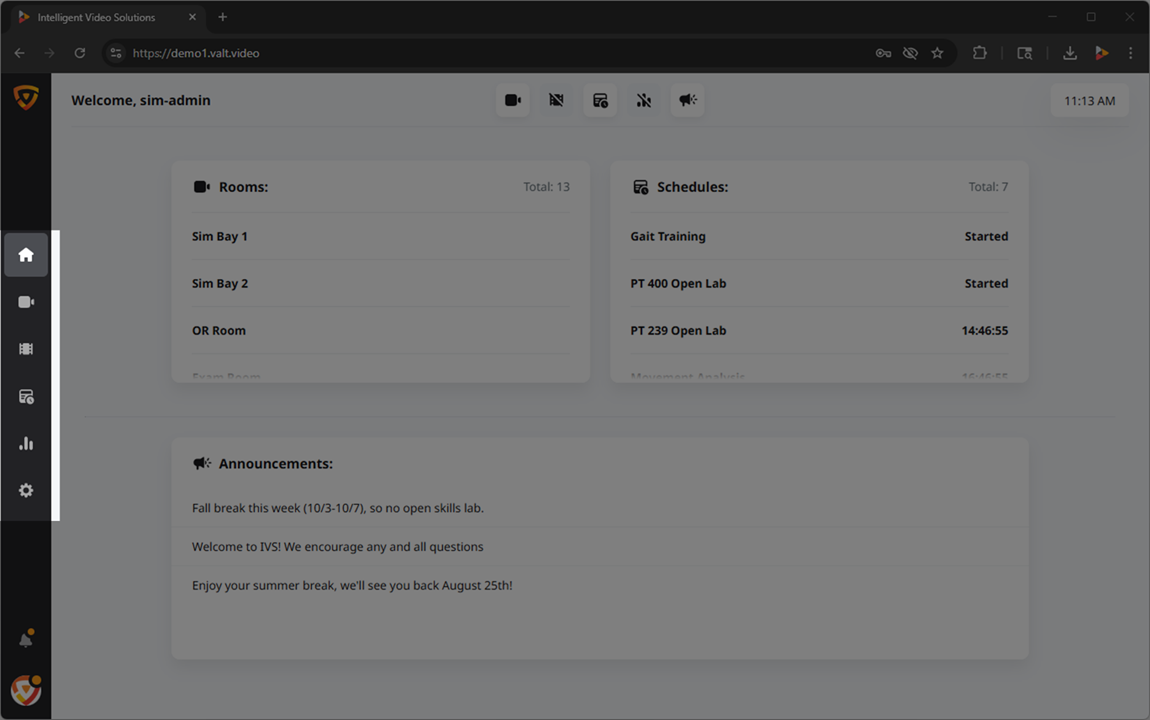 🖼️.
🖼️.
Access to these sections, and their associated features, can be controlled at two distinct levels within the software: the group level and the user level.
Outside of the core 6 sections found within the main navigation, there are two additional permissions that can be revoked or granted.
Role Management
User Groups
At the core of our permission structure, the majority of access is defined at the group level. By establishing permission settings at this level, you can streamline management and ensure consistent access controls for users within the same group.
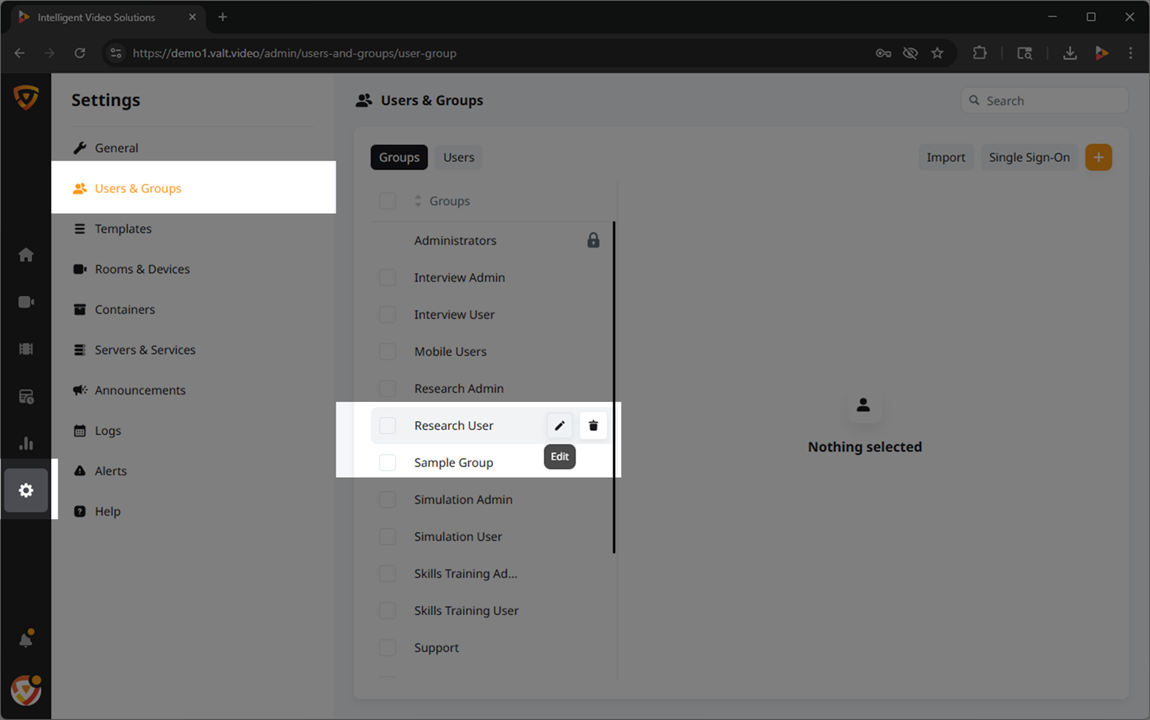
Users
Rights defined at the group level are automatically inherited by the individual users assigned to those groups, simplifying the administration of rights.
In addition to the group-level rights, our software allows for further customization at the individual user level. This means that specific access rights can be fine-tuned to cater to unique requirements, providing an extra layer of control over user privileges.
Rights
How They're Applied
- Group-Level
- Here are lists of the rights
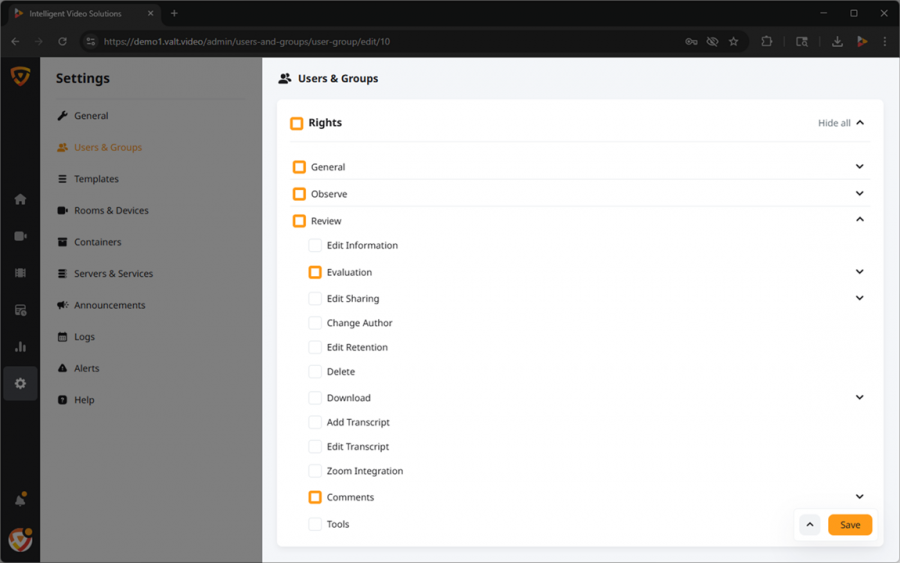 🖼️ within VALT and the corresponding access they grant. The tables below illustrate whether each permission can be configured at the group level, user level, or both.
 - User-Level Override
- While permissions are primarily configured at the group-level, additional permissions can be granted at the user-level.
✎Permissions can only be granted at this level. Permissions are revoked at the group-level.
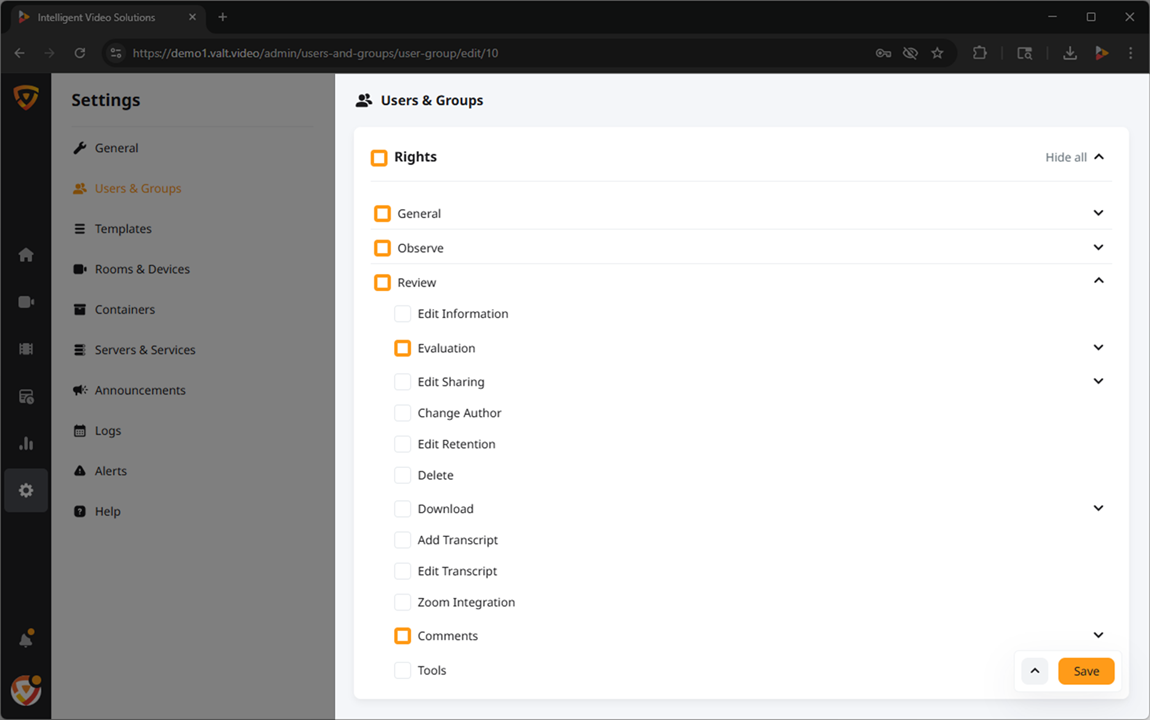
Available Rights
The following section aims to highlight a few key permissions in each section that one might want to consider enabling/disabling. If you want to see a more comprehensive list of permissions, click here.
- General
-
Grants access to the features within the General section.
🕮This section applies to buttons or notifications that are system wide.
- Observe
- This section of the software is used to view live sessions and create recordings.

- Review
- This section of the software is used to view previously recorded sessions, update metadata, download, and delete existing videos.

- Schedule
- This section of the software is used to schedule recordings that will take place on a specific date, at a specific time, and will last for a fixed duration.

- Reports
- Allows users to generate simple statistical reports about usage of the VALT system.

- Settings
- Grants the ability for a user to view general system statistics including software version, licenses, and storage amount.
