Axis M5526-E: Difference between revisions
Jump to navigation
Jump to search
IVSWikiBlue (talk | contribs) Created page with "{{Article | title = {{PAGENAME}} | content = {{Flexbox | left = <h2 style="text-align:left">Camera Information</h2> <dl class="singleLineHeight"> <dt>Max Resolution</dt..." |
IVSWikiBlue (talk | contribs) No edit summary |
||
| (39 intermediate revisions by the same user not shown) | |||
| Line 1: | Line 1: | ||
{{Article | | {{Article - Manual | content = | ||
{{Float | content = [[VALT Devices | ⤺ Back to VALT Devices]] }} | |||
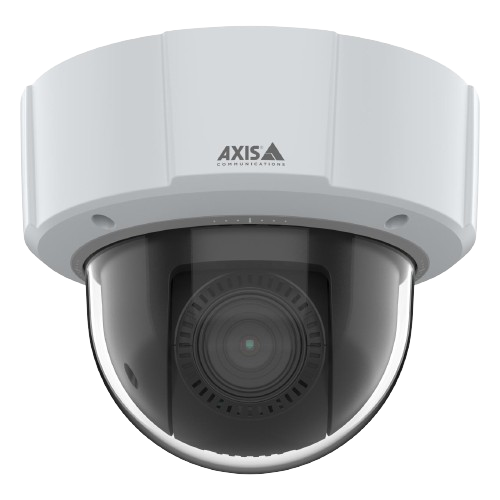
<h1 style="text-align:left">Axis M5526-E</h1> | |||
{{Flexbox | left = | {{Flexbox | left = | ||
< | <div style="border:solid 1px #dddddd;max-width:260px;min-width:fit-content;padding:10px;border-radius:20px;background-color:#FAFAFA"> | ||
<dl class="singleLineHeight"> | <dl class="singleLineHeight"> | ||
<dt>Max Resolution</dt> | <dt>Max Resolution</dt> | ||
<dd>2688 x 1512</dd> | <dd>2688 x 1512</dd> | ||
</dl> | </dl> | ||
{{hr - 2}} | {{hr - 2}} | ||
<dl class="singleLineHeight"> | <dl class="singleLineHeight"> | ||
<dt>FOV</dt> | <dt>FOV</dt> | ||
<dd>H: 59.1°-6.5° <br> V: 35°–3.67°</dd> | <dd>H: 59.1°-6.5° <br> V: 35°–3.67°</dd> | ||
</dl> | </dl> | ||
{{hr - 2}} | {{hr - 2}} | ||
<dl class="singleLineHeight"> | <dl class="singleLineHeight"> | ||
<dt>PoE</dt> | <dt>PoE</dt> | ||
<dd>Class 3</dd> | <dd>Class 3</dd> | ||
</dl> | </dl> | ||
{{hr - 2}} | {{hr - 2}} | ||
<dl class="singleLineHeight"> | <dl class="singleLineHeight"> | ||
<dt>Max Power Draw</dt> | <dt>Max Power Draw</dt> | ||
<dd>12.95 W</dd> | <dd>12.95 W</dd> | ||
</dl> | </dl> | ||
{{hr - 2}} | {{hr - 2}} | ||
<dl class="singleLineHeight"> | <dl class="singleLineHeight"> | ||
<dt>Features</dt> | <dt>Features</dt> | ||
<dd>Talkback</dd> | <dd>- Talkback</dd> | ||
<dd>Supports 2 I/O Devices</dd> | <dd>- Supports 2 I/O Devices</dd> | ||
</dl> | </dl> | ||
</div> | |||
| right = | | right = | ||
{{img | file = M5526-E HD No Background.png | width = | {{img - resize | file = M5526-E HD No Background.png | width = 350px}} | ||
}} | }} | ||
{{hr}} | |||
<h2>Removing the Dome</h2> | |||
{{flexbox | left = | |||
To remove the dome, you will need a <b>T20 security bit</b>. Use the T20 to loosen the four screws. Once complete, the dome will be ready to be removed. | |||
{{Aside - Helpful | content = The Axis [https://www.axis.com/dam/public/bd/4f/93/installation-guide-axis-m5526-e-ptz-camera-en-US-479323.pdf installation guide] can be found here.}} | |||
| right = {{img - no click | file = M5526 Remove Dome.png | width = 250px}} | |||
}} | }} | ||
{{hr}} | |||
<h2>Audio and I/O</h2> | |||
The {{PAGENAME}} has <b>2 terminal blocks</b> used for wiring <b>audio</b> and <b>I/O accessories</b>. | |||
{{hr - 2}} | |||
{{Flexbox | left = | |||
The <b>audio block</b> allows for both <em>audio in</em> and <em>audio out</em>. The <em>audio in</em> connects to a variety of microphones, utilizing line level audio. | |||
To see a list of microphones [[Microphones | click here]]. | |||
| right = | |||
{{img - no click | file = Axis camera io audio block-new.png | width = 300px}} | |||
}} | |||
{{hr - 2}} | |||
{{Flexbox - Text Right | right = | |||
The <b>I/O block</b> for supports 2 I/O accessories. | |||
Popular I/O accessories include the [[VALT Record Button]] and the [[VALT Privacy Button]] | |||
| left = | |||
{{img - no click | file = 6 port io block.png | width = 300px}} | |||
}} | |||
{{hr}} | |||
<h2>Additional Resources</h2> | |||
{{Grid 2 | left_width = 400px | left = | |||
<h3>General Documentation</h3> | |||
*[https://www.axis.com/dam/public/69/1c/b8/datasheet-axis-m5526-e-ptz-camera-en-US-432230.pdf Datasheet (PDF)] | |||
*[[Camera Settings | IVS Camera Setting Standards]] | |||
*Reseat the Network Cable | |||
*:[https://valt.wistia.com/medias/n0otfrkjbk ▶️ at the camera end] | |||
*:[https://valt.wistia.com/medias/fn1g8tnkt3 ▶️ above the ceiling] | |||
| right = | |||
<h3>Wire Diagrams</h3> | |||
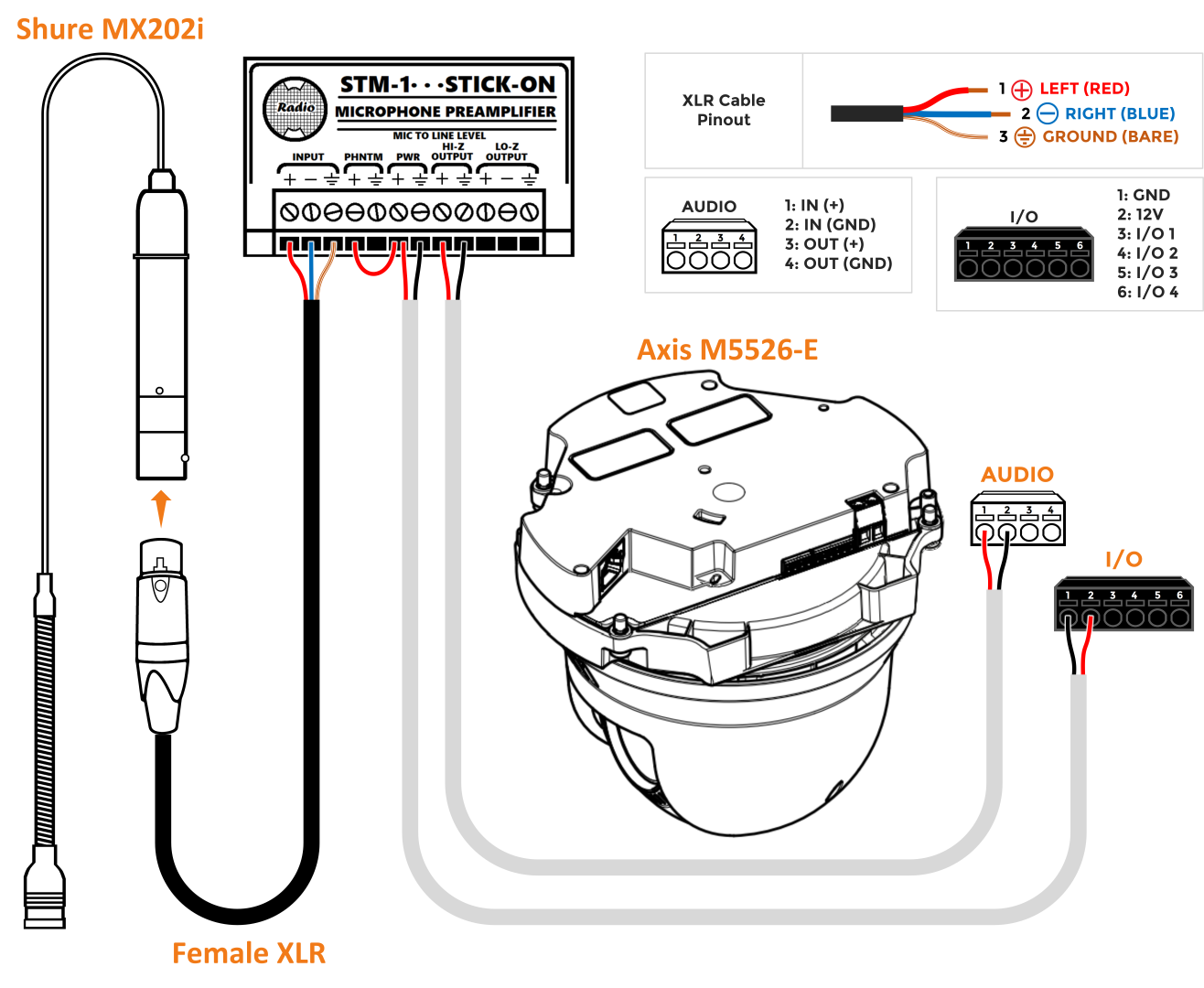
*[[Media:M5525 and STM-1.png | Shure MX202i]] | |||
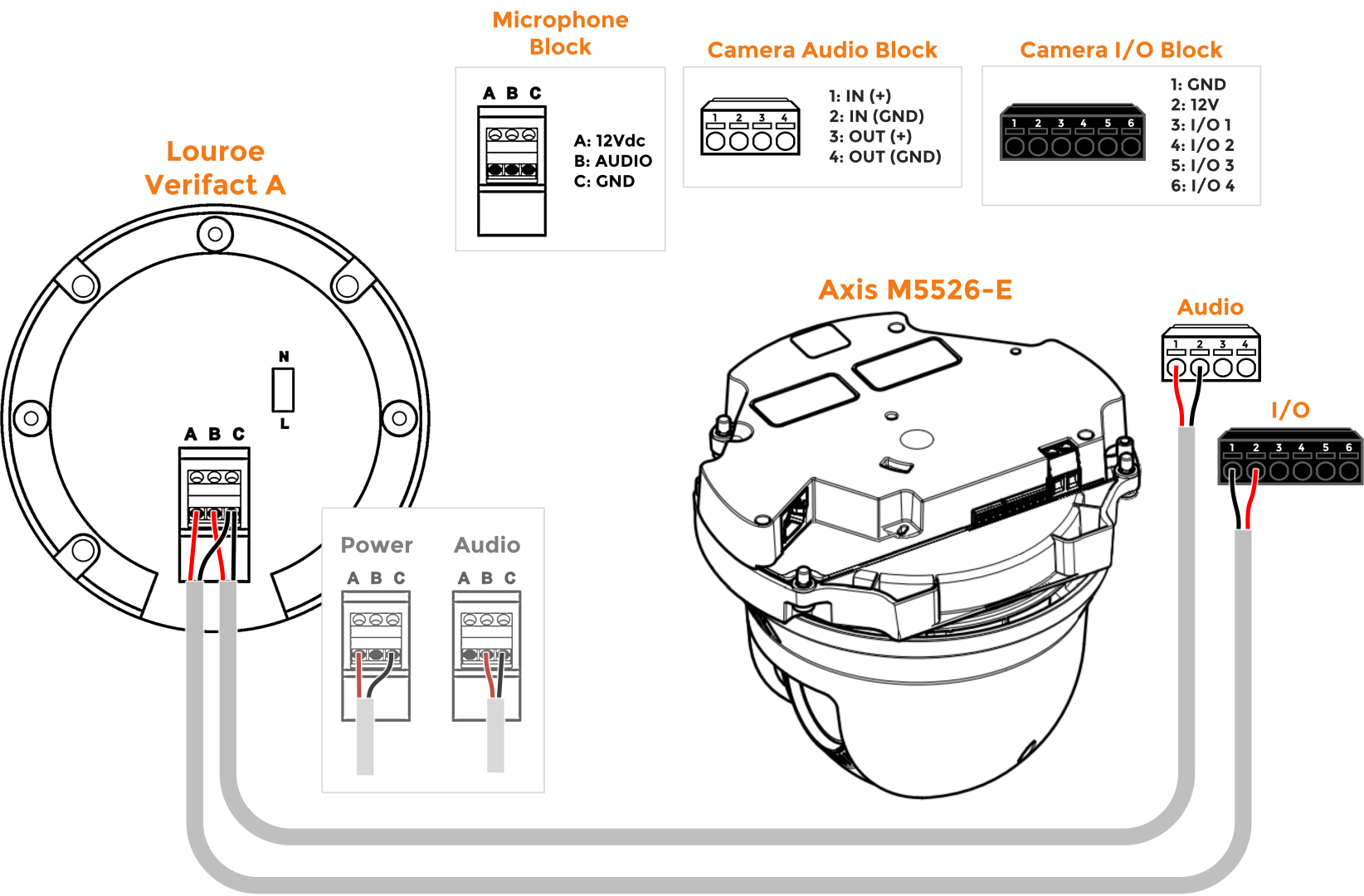
*[[Media:M5525 and Louroe Verifact A (Large).png | Louroe Verifact A]] | |||
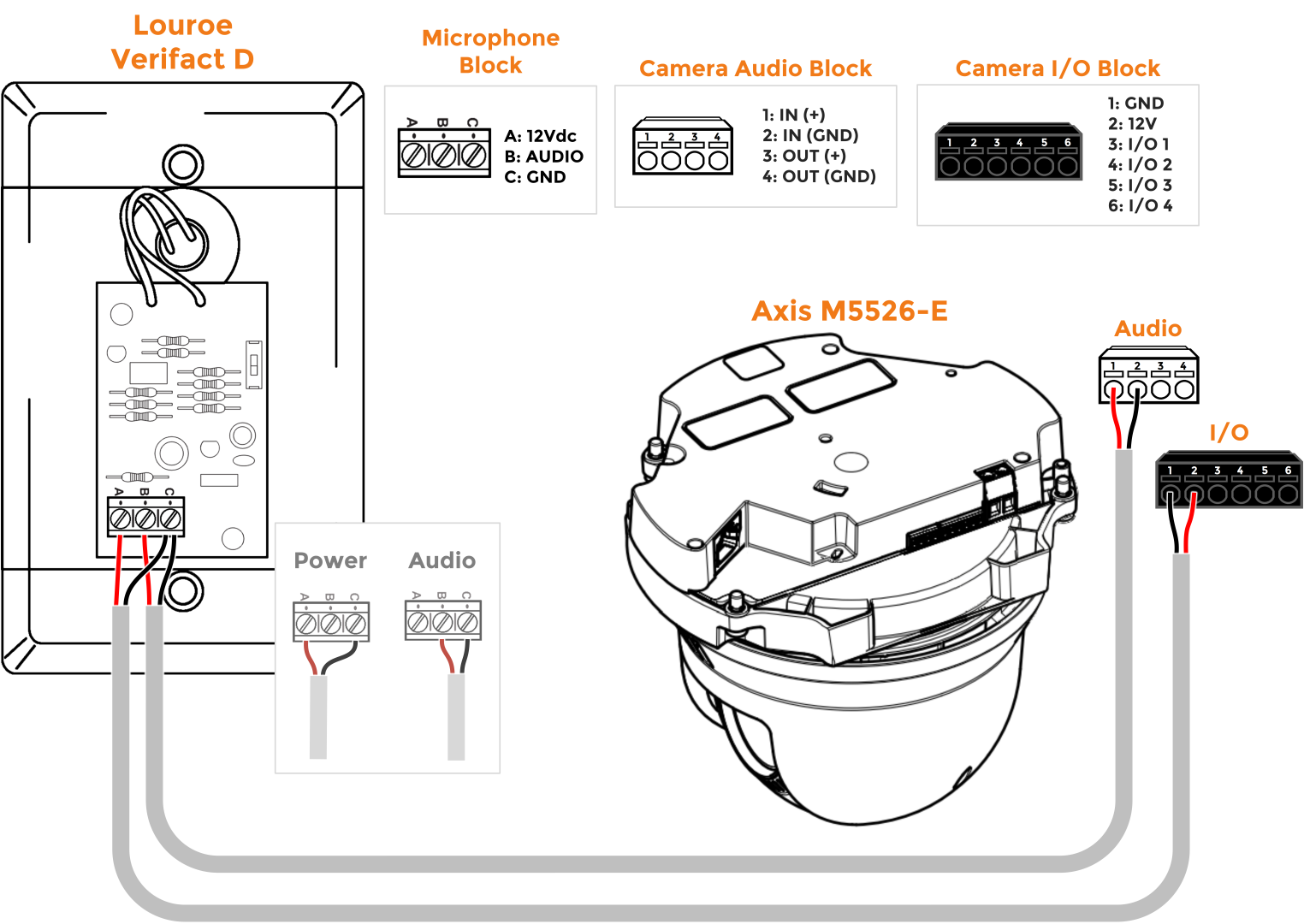
*[[Media:M5526 and Louroe Verifact D (Large).png | Louroe Verifact D]] | |||
}} | |||
{{hr - 2}} | |||
<h3>Mounting Information</h3> | |||
*[[Axis T91E61]] | |||
}} | |||
[[Category:Axis M5526]] | |||
Latest revision as of 15:31, 15 May 2026
Axis M5526-E
- Max Resolution
- 2688 x 1512
- FOV
- H: 59.1°-6.5°
V: 35°–3.67°
- PoE
- Class 3
- Max Power Draw
- 12.95 W
- Features
- - Talkback
- - Supports 2 I/O Devices
Removing the Dome
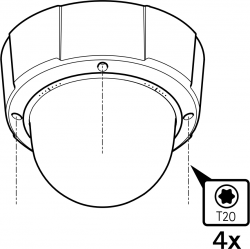
To remove the dome, you will need a T20 security bit. Use the T20 to loosen the four screws. Once complete, the dome will be ready to be removed.
🕮
The Axis installation guide can be found here.
Audio and I/O
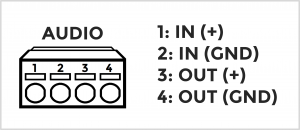
The Axis M5526-E has 2 terminal blocks used for wiring audio and I/O accessories.
The audio block allows for both audio in and audio out. The audio in connects to a variety of microphones, utilizing line level audio.
To see a list of microphones click here.
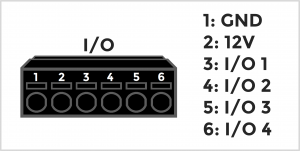
The I/O block for supports 2 I/O accessories.
Popular I/O accessories include the VALT Record Button and the VALT Privacy Button
Additional Resources
General Documentation
- Datasheet (PDF)
- IVS Camera Setting Standards
- Reseat the Network Cable