Video controls do not load in Chrome: Difference between revisions
Jump to navigation
Jump to search
IVSWikiBlue (talk | contribs) Created page with "Click on the information section of the browser, if SSL is used click on the green lock. File:flash_block1.jpg Change Flash to Allow as shown below. File:flash_block2.j..." |
IVSWikiBlue (talk | contribs) No edit summary |
||
| (10 intermediate revisions by the same user not shown) | |||
| Line 1: | Line 1: | ||
Click on the information section of the browser | <div class="section"> | ||
# Click on the information section of the browser. If SSL is used, click on the green lock icon. | |||
#:{{img | file = ChromeFlash10.png}} | |||
Change Flash to Allow | # Click on '''Site Settings'''. | ||
#:{{img | file = ChromeFlash11.png | width=600px}} | |||
# Change '''Flash''' to '''Allow'''. | |||
# Reload the Page. | |||
</div> | |||
Latest revision as of 15:35, 5 January 2023
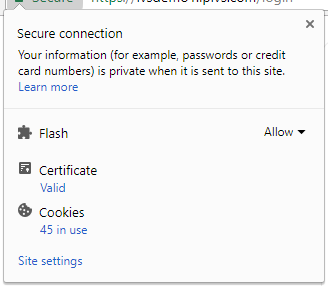
- Click on the information section of the browser. If SSL is used, click on the green lock icon.
- Click on Site Settings.
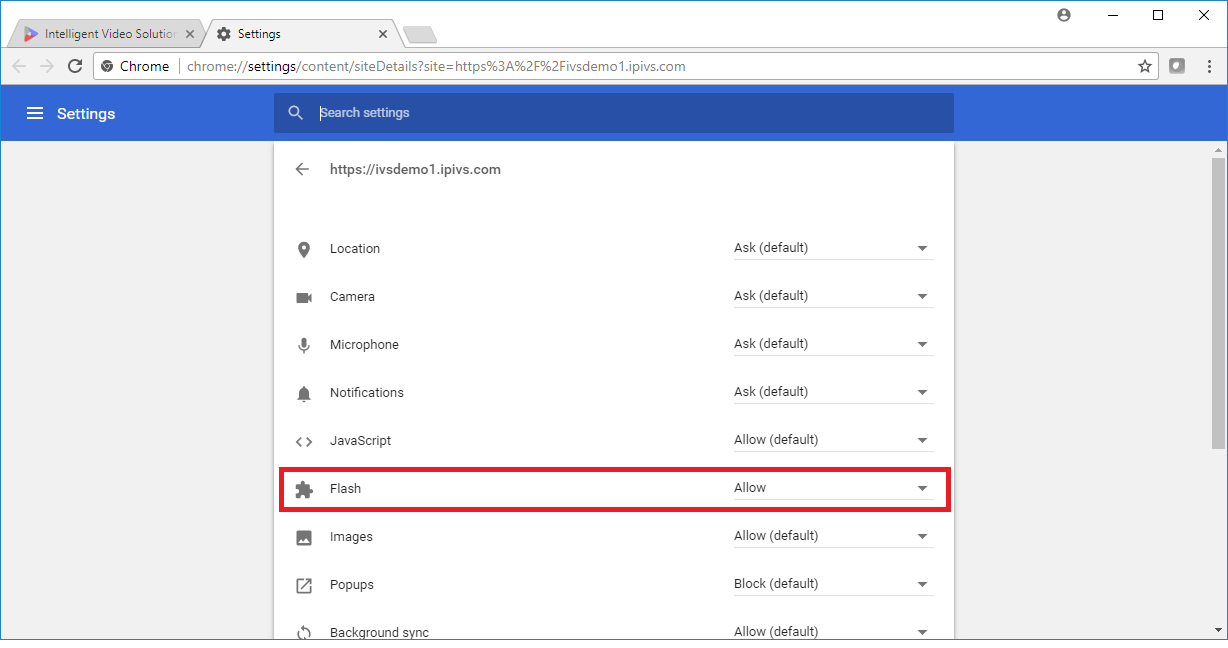
- Change Flash to Allow.
- Reload the Page.